


[nextpage title=”Overview and Specifications”]
Nokia’s latest Lumia smartphone yet features the full HD display with 1080p resolution on 6-inch display, 20 Megapixels PureView camera, 2GB of RAM and a Quad-Core processor. That’s makes it the most powerful smartphone running Windows Phone OS.

Let me say it again, it’s a massive 6-inch screen which is not very easy to handle for most of you there unless you’ve got some big gorilla hands. Comparatively, it’s even bigger than the Samsung flagship Galaxy Note 3 which sports a 5.7” display screen.
In the line-up of phablets where Samsung has its Galaxy Note 3 – Sony is with the 6.4 inch Xperia Z Ultra and HTC has come up with 5.9 inch One Max, Nokia Lumia 1520 is a bit larger than the current Galaxy Note 3 and HTC’s One Max. As expected, it’s too big for a regular use of the phone just like other competitors but provides much better experience specially for reading ebooks, browsing internet, exploring apps, watching videos and playing games. To carry it around as your primary phone, you will need deep wide pockets and big hands.
Well of course you can grip it in hands but it’s not manageable single handed.

We’ve seen bigger screens for long now where currently Samsung’s Galaxy Note range of devices dominate the market. Beyond my love thoughts about big screen phones, rapidly adopting market suggests that people do like to have big screen phones which named with the term as “phablets” referring to mixture of a phone and tablet. Well, Nokia seems to have seen the demand and deliver in the same context with giving the customers another option to choose big phones that run Windows Phone OS. Not just the option of change of user experience, Nokia Lumia 1520 gives really healthy hardware including 2GB of RAM, up-to-date Qualcomm Snapdragon 800 Quad-core processor. However we’ve seen 1080p full HD displays on Android line-up for quite a long time, Lumia 1520 also stands alone with its PureView branded camera with 20MP imaging sensor, we’ll talk in detail.
Specifications (Official)

- Windows Phone 8 OS. Lumia Black firmware installed.
- (Height x Width x Thickness) 162.8mm x 85.4mm x 8.7mm – Weighs 209g.
- Display: 6” screen size diagonal, 1080p resolution full HD (1920 x 1080), Pixels density 368 PPI. ClearBlack, IPS LCD.
- Brightness control, Orientation sensor, Corning® Gorilla® Glass 2, Easy to clean, High brightness mode, Lumia Color profile, Nokia Glance screen, Wide viewing angle, Super Sensitive Touch and Nokia Glance Screen.
- CPU: Qualcomm Snapdragon™ 800 Quad-core 2.2 GHz.
- 2GB of RAM, Internal Storage 16 GB. Expandable micro SD support.
- 20MP PureView Primary Camera with 1/2.5-inch BSI CMOS sensor. dual LED flash.
- Carl ZEISS optics, f/2.4 lens with 6 elements, 26mm equivalent focal length, Optical Image Stabilization, 2x lossless zoom.
- Video Recording: full HD 1080p (1920 x 1080) at 30fps with 3x digital PureView zoom.
- Front-facing, 1.2MP “wide angle” camera
- Bluetooth 4.0, Nano SIM card support,
- Rich Audio Recording.
- Sensors: Ambient light sensor, Accelerometer, Gyroscope, Proximity sensor, Magnetometer
- 3400mAh battery (non-removable)
- Available in 4 colors: Yellow, white, black, glossy red.
The hardware of Nokia Lumia 1520 actually meets with the level of competition very well excluding the camera. Well because that’s obviously a big point in Nokia’s hardware.
[nextpage title=”Design, The Look and Feel”]
Design, the Look and Feel
Visually Nokia Lumia 1520 preserves the look and feel from its family (the Lumia range) matching mostly with the Nokia Lumia 720 on the front while differing at the little sharp corners of Lumia 1520 instead of the rounded ones on Lumia 720. That makes it a different design combining various design elements from different Lumia devices.
The hand-grip is good but not suitable for everyone out there. I, with my hands, can feel it would be the largest phone I can hold in my hands which is little less than easy. But it’s not that it will look bad, it would rather draw attention. Bigger phones have already been in markets and people use them in public very openly. Not even they feel awkward getting them out of the pocket (if it can reside in there) to attend a call and get closer to their face which almost matches the size of the device. Well, I have never been in favor of carrying around such a big device as my regular phone.

I can’t tell about anyone. For me, I can’t take this phone (or any phone) with me all the way in my carrying in my hands. My pockets are well suited for my phone but for such a big phone there is possibility that one of your jeans pocket is not enough for it. By the way most of my pockets were able to get it inside. Otherwise I can take it in my laptop bag, in my car, put it on my desk, on the side table of my bed, have it in my hands while playing games in a living room, check emails or do some office work.
Seriously, tell you the truth, I never liked such big phones from Samsung even for their approach of enlarging every next Galaxy S flagship, but here I would really appreciate them for their consistency with bigger devices as people liked them and actually bought them. As well the other manufacturers followed the approach including Apple and Nokia. They both also started putting some extra measurements in their devices. I’ll see, for how long people keep liking and accepting this trend. Look at the visual difference of Samsung Galaxy Note III 5.7” display (left) and Nokia Lumia 1520 with 6” display (right)
Side by side: Samsung Galaxy Note III (left) – Nokia Lumia 1520 (right)

Side by side (rear view): Samsung Galaxy Note III (left) – Nokia Lumia 1520 (right)
There is a need to mention that if you are familiar with the weight of Galaxy Note III which (168 grams) then you can have an idea for Lumia 1520 which weighs 209 grams. It actually feels heavy carrying Lumia 1520 but for the size when you look at, that “feel” waves off. You would think it’s alright.
Side by side: Nokia Lumia 1520 (left) & Nokia Lumia 1320 (right)

So what my recommendation is about it? Well if you do not have an issue with the size, of course you won’t when you like phablets, then the Lumia 1520 will please you with its premium look and feel. Because even I, not a lover of big screens, will like to buy it. On the plus point, I always welcome the color variations from Nokia. It can match your personality with yellow, white, black and glossy red. I personally prefer black or white for any phone.
The rear side of the Lumia 1520 matches a little bit at camera housing with 41MP Lumia 1020 where it extrudes the lens compartment outwards with the dual-LED flash above the camera.

What I didn’t really like much on this glossy finished red Lumia 1520, it develops static charge and captures the lint pretty quickly. I am sure other variants which are not glossy like above, would have been free of such a factor.
Let’s talk about some outside elements of the Nokia Lumia 1520 as how you can reach every usable component on the phone without opening it. Well, you can not actually open it. It’s unibody and I of course love it. What I do not love about unibody form of these smartphone is the non-user-removable battery.

A little extruded camera housing is present on the Lumia 1520 which is not as bigger as found on Lumia 1020. Above the big lens there is the dual-LED flash. We’ll talk about 20MP PureView camera in detail below.
Front profile of the Lumia 1520 presents the full length screen from top to bottom covered with the Gorilla Glass 2 curved on the edges. The unibody frame is still visible on the edges.

The screen covers the 6” display with 1080p resolution in the middle while it also houses the top earpiece for phone calls along side the front-facing camera and sensor under the glass.


The bottom part of the screen provides the standard capacitive Windows Phone keys, back, start and Bing search. A mic is visible in between the screen and the body frame.
Top panel of the Lumia 1520 hosts only the 3.5mm audio jack. On the bottom side the micro USB port is provided for charging and connectivity.


On the right side of the Lumia 1520, just like always in a Nokia handset, there is a volume control, a power/lock/unlock button and a dedicated hardware 2-stage camera shutter key.


Left side of most of the phones remains empty from Nokia but the Lumia 1520 stays in the family of devices where every side of phone serves with a purpose. On the left you can access micro SD card slot and nano SIM card slot and can open them with a provided SIM card unlock key.


That’s it! the design elements end here.
But I guess you might still be thinking about how much it is big and how would it fit with you. Let’s just leave the Lumia 1520 apart in this regard. Any smartphone coming into the size of around 6 inch might be adoptable by some of the individuals. Other may not be happy with such a big device for their phone. Nokia on the other hand has built big phones even before the current age of smartphones, you may call them bulky but solid and pure. I believe Nokia Lumia 1520 would also be acceptable by some while other will be staying away from it. This all depends on one’s own choice and style.
[nextpage title=”Display and Battery Performance”]
Display & Performance
Nokia’s proprietary elements in their smartphones does offer a comprehensive feel of appearance and usability. That stays intact in Lumia 1520 with the full HD display of 1080p resolution on an ClearBlack IPS LCD display and better contrast ratio outdoors being good in sunlight readability when turned on in “Phone Settings”.
6” screen size diagonal with 1080p resolution full HD (1920 x 1080) provides the pixels density of 368 PPI. Nokia’s proprietary ClearBlack technology helps out the IPS LCD to deep blacks at pretty good level. Gorilla Glass 2 helps with protection of the screen as well the added polarizing filters helps minimizing glare.

The screen is sharp with the Windows Phone tiles covering within the 368 PPI that is more than enough that could be resolved by an eye. Viewing angles are also perfect unless you take it to extreme wide angle when the contrast shifts at some level.
When talking alone about the Lumia 1520 then the outdoor visibility and readability is moderate enough but when comparing, the competition is ahead of it. The AMOLED display would have helped it a lot to get better than what it is currently with an IPS display. I still haven’t seen sunlight contrast ratio better than Nokia 808 PureView but as we are just talking about phablets here. Galaxy Note III is far better outside in direct sunlight than Lumia 1520.
What else Nokia gives to the user to handle the display temperature and saturation in colours with is the Lumia Color profile. Plus Nokia Glance Screen uniquely gives a humble and usable feature to Windows Phone 8 devices.

Battery Performance
As told above, the battery is not removable by user in favor of the unibody of Lumia 1520. 3400mAh capacity is much for the device that, during our test period, could keep it up for long 2 days or even more with moderate regular use with single full charge. Without a SIM card inserted, the Lumia 1520 lived more than 4 days with single charge. Wi-Fi and all other features were kept enabled. What the phablet did during this span was, playing games like Asphalt 8, Temple Run 2, Subway Surfers etc. browsing internet and social networks on the browser and apps as well.
This actually justifies, having a battery with that big capacity to support bigger display of the phablet as well as the hardware inside it has. Officially Nokia rates it to keep up for 32 days on standby, 27 hours on 2G talk time, 25 hours on 3G, 124 hours on music playback, 10 hours on video playback, 13 hours on Wi-Fi browsing. I personally want to have idea of the time period for camera use while all all other features remains silent while on tour or something.
The international variant of Lumia 1520 also supports Qi-wireless charging as it’s built-in. You will need to have compatible wireless charger for that purpose. In US the AT&T variant of the phablet does not support wireless charging unless an add-on accessory back cover is used.
[nextpage title=”Camera, Still Photos, Video Samples”]
Camera: The genes of PureView
Nokia Lumia 1520 is the latest addition to the devices with the PureView camera features that actually keeps it above all the phablets in the competition regarding the camera capability and performance.

We have done an extensive camera review for Nokia Lumia 1020 with its 41 megapixels larger sensor. So I am just reserving an other extensive camera review for Lumia 1520 but here we have yet much detail about the camera this phablet has got.
The camera in Lumia 1520 keeps it ahead of the competitive phablets
One simple line about it is of course the fact that the camera in Lumia 1520 keeps it ahead of the competitive phablets for that exclusive purpose. However the 20 megapixels sensor in Lumia 1520 is smaller in size that’s just 1/2.5 (0.4) inch if compared to the Lumia 1020 that’s got 1/1.5 (0.67) inch on sensor – let alone the Nokia 808 PureView with its 1/1.2 (0.8) inch sensor, but it’s way too good when comparing with its competitors. But wait there is a contender with a bit larger sensor. Sony’s Xperia Z1 has got 1/2.3” sensor where it has about 8% more sensor area, but we haven’t compared both with the photo result.
Camera Specifications in Lumia 1520
- 20MP PureView Camera
- Physical sensor size and type: 1/2.5-inch BSI CMOS
- Lens Type: f/2.4 aperture lens with 6 elements
- Focal length: 26mm equivalent
- Optical Image Stabilization
- dual LED flash
- 2x lossless soft zoom
- Front-facing, 1.2MP “wide angle” camera
Lumia 1520 has been tagged with the PureView but it does not inherit a lot of from the PureView family. The camera has smaller lens opening which is f/2.4. There is no Xenon flash either for capturing in dark perfectly. There indeed is the presence of Optical Image Stabilizer for which we can say that it mostly matches with the starting PureView Lumia range e.g. Lumia 920, Lumia 925 with improved sensor but it can’t match with the recent Lumia 1020 has each bit to shoot in low-light including the larger aperture and Xenon Flash and on top of that is the larger sensor with maximum pixels.
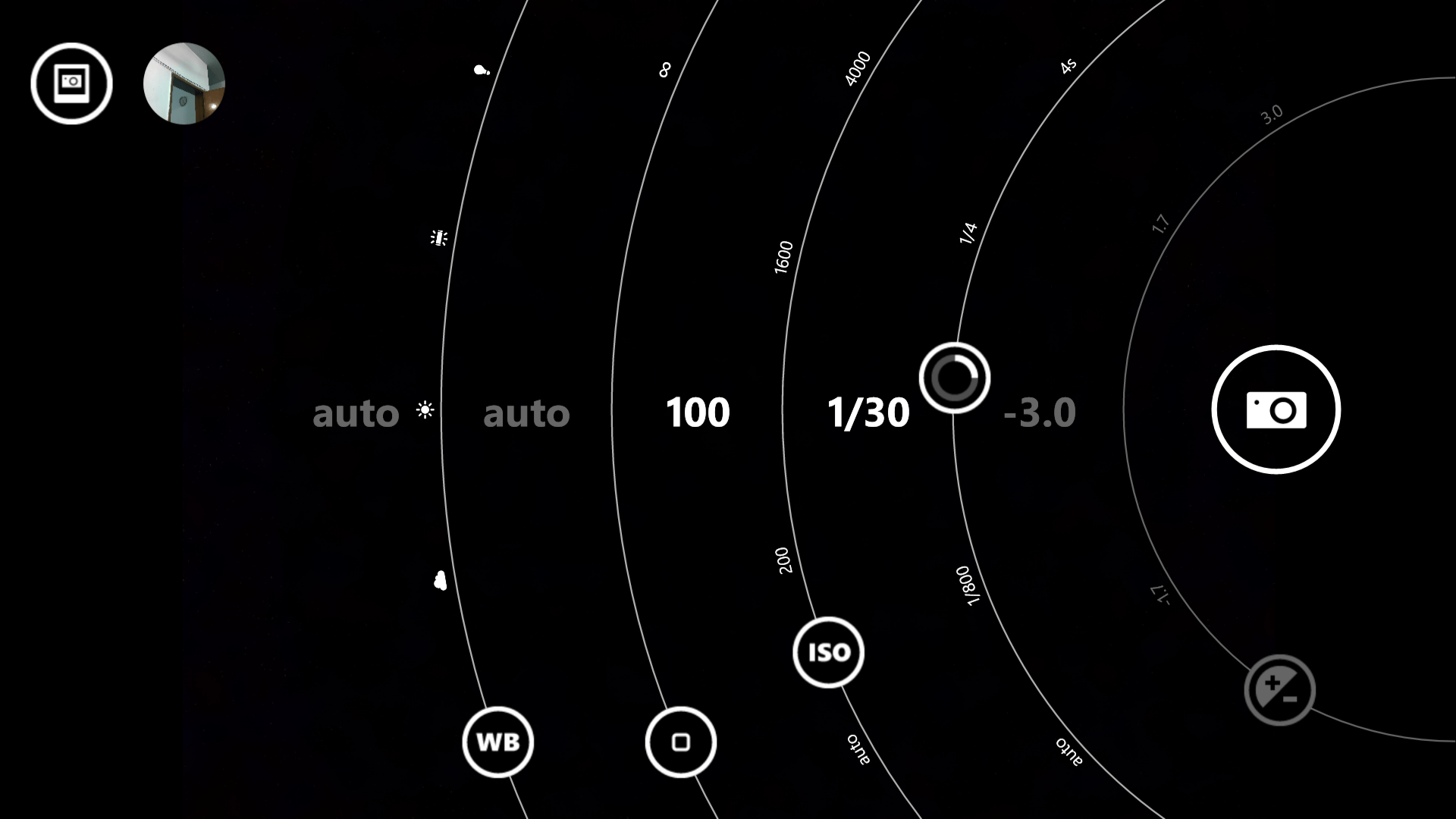
The optical image stabilizer in Nokia’s PureView devices really worth complements. No matter it can’t match with the results produced with the Lumia 1020, but it still can shoot in much easy way in dark. Nokia Camera (aka Nokia Pro Cam) is he helper for you. The app is one of the best software features Windows Phone has got. (Nokia Camera with Nokia Lumia 1020, Nokia Pro Cam with Nokia Lumia 925)
The very healthy battery of 3400mAh helps a lot when you go out for shooting. That’s where I hesitated a little with Lumia 1020. More than a day can be managed very easily with Lumia 1520 when charged fully before you need to charge it again. Another thing Lumia 1520 has got an edge from Lumia 1020 is the performance. Yes! with the powerful quad-core Snapdragon 800 which is made actually to process more than 20 megapixels from the image sensor, Lumia 1520 shoots way faster than Lumia 1020. I’ll say here that there is still no driver for Nokia’s 41 megapixels camera on Lumia 1020. Snapdragon S4 Plus in Lumia 1020 which was also capable to process up to 20 megapixels, Nokia did pretty well with Windows Phone 8 OS to process as much as 41 megapixels that ended with some performances issues such as shot-to-shot delay. So according to numbers Lumia 1520 takes about 3 seconds to bring up the camera interface in front and make it ready. Later startup time is little faster. Then shot-to-shot time delay is about 1.5 seconds which is significant improved when compared to Lumia 1020 but that still stays behind the competition where latest Android shoots faster with the camera as does the latest iPhones. Sure their camera modules and sensors are not matched with the ones in Lumia 1520 or either from Nokia.
We have learnt about the term “PureView” since the days of Nokia 808 PureView where the basic technique was to oversampling the pixels and produce much improved image with great detail and as less digital noise as unnoticeable. Then Nokia introduced Optical Image Stabilization in their “PureView” tagged cameras. But later came the combination of both in Nokia Lumia 1020 PureView. Now we have Nokia Lumia 1520 again backwards from 41 megapixels to 20 megapixels which is still higher in numbers than most of the competition as well as the image sensor that’s larger in size. Going backward, Lumia 1520 still has guts in photography and its performance due to improved core hardware as mentioned above.
During the Symbian days the color reproduction from Nokia devices was used to be much accurate, that I always appreciated. Later in Windows Phone devices including Lumia 1020, the oversaturation of colors had become an issue to most of the users. Nokia listened to the feedback and fixed at where they were wrong and they shipped the Nokia Black software update reverting back and fixing the issues even on Lumia 1020.
Lumia 1520 comes with Nokia Black software update pre-installed, hence with color reproduction, it’s as accurate to natural as possible to match the saturation of Nokia 808 PureView. There is still no presence of auto HDR feature in camera where you can shoot with bracketing and combine the image on your computer to produce HDR images. Once again, the dynamic range is impressive in both still and video recording. A slight problem with managing white balance, but that’s an easy task for you to manual choose white balance from the “WB” ring on the interface.
Outdoor shots with automatic settings where Lumia 1520 mostly used base ISO 100 in bright sunlight.
|
|


Theoretically like Nokia 808 PureView and Lumia 1020 PureView, the Lumia 1520 also shoots with its maximum 20 megapixels and then produces 5 MP image along with the 19 MP image simultaneously. Where 5MP image contains greater detail of al the 20 megapixels on the sensor that you can share all the way to social networks like facebook, twitter or anywhere directly from the Windows Phone. Also the digital noise in 5MP image is just non-existent. When transferring the images to your computer, you can have 19 MP image as well to work with or for printing purposes. Comparatively, yes! the 5MP (provided that it contains image information of 20 megapixels unlike 41 megapixels) still unbeatable by other smartphones. As well the full 19MP image also has much detail and less digital noise (not up to the quality of Lumia 1020 and 808 PureView though) when compared to the competitors in its class.
Manually controlled lowlight shots


Above images were shot with manually settings as needed for proper exposure. What I took care of was to stay as stable as I could with the slower shutter speeds but the final images looked enough impressive to show the stability of OIS in Nokia Lumia 1520. Second the dark areas are also impressive with the noise almost non-existent. Check both the 5 MP and 19 MP image to see how the 5 MP image is more sharp than the high resolution image.
Indoor using flash
A colleague of mine on the left (image below) was just passing by when I just took it with flash on. The dual-LED flash on Lumia 1520, I think is better and less yellowish than older Lumia devices. However it can’t match with the performance of Xenon flash. The range is very limited as it can’t lit the subject completely away from more than 2 meters as the Lumia 1520 would still use the slower shutter speed. With the automatic settings, Lumia 1520 prefers the base ISO 100 when shooting with flash on but keeps the shutter speed down to 1/15th of the seconds to get more light. With a better Xenon flash it would have done lot better with faster shutter speeds.


In the image on the right side above you can clearly notice the dark corners on the white wall which is less noticeable on the bottom part of the photo due to the already darker wood rack. The subjects are nearer than 2 meters along with the wall behind them. The flash only could lighten up the center point even with the shutter speed of 1/15 seconds. Of course increasing the shutter speed won’t be a solution for that as the center point will be overly exposed if you will try to get more light on corners. In such a situation using flash will be a problem when you want to snap most of the area rather than only the center point. Focusing single subject, if that’s also in the center, will be good to shoot. Or otherwise if you got to take portrait shot within the range, you are good to go with it which is the mostly used situation for flash.
Some ISO tests to check noise levels:
 |
Shutter speed: 1/17 ISO Sensitivity: ISO 800Close up was possible at around 15cm for being the minimum focus distance. But the noise level is still impressive at ISO 800 that camera chose automatically to shoot faster at 1/17th of the second.Download 5 MP Image Download 19 MP Image |
 |
Shutter speed: 1/4 ISO Sensitivity: ISO 200A slight color variation occurred with the yellow tone when I took the shot right after the above at ISO 200, camera used the 1/4th of the second. Noise level of course got even better as well as the image is tack sharp. It was hand held, thanks to OIS.Download 5 MP Image Download 19 MP Image |
Lumia 1520 has got smaller aperture of f/2.4 than the f/2.2 in Lumia 1020 but shallow depth of field is noticeable in above close ups and in fact impressive yet competitive amongst various other smartphones as the feature may be used in situations when you want to focus the subject while blurring out the background elements.
Lossless Zoom 2x
2x zoom in Lumia 1520 offers the same lossless zoom that we have seen in Nokia 808 PureView and Lumia 1020. The zoomed image is provided in 5 MP shot which is cropped from the full 20 MP image providing actual image detail instead of enlarging it (that other smartphones do in digital zooming). In the zoomed 5 MP image there is no oversampling of pixels remain to provide extensive detail of the image but provides actual detail of the image as it was shot.
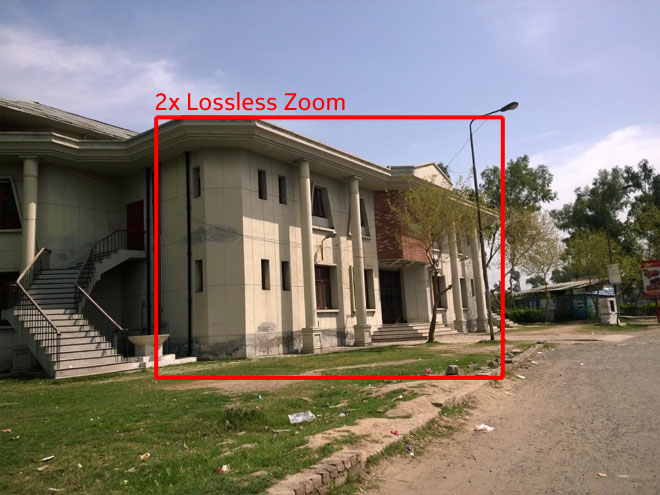
It can be later zoomed back to 1x to have extensive detail of the image as Nokia Camera app provides the facility until the 19 MP JPEG image stays on the phone.
Note: when shooting in RAW images, the facility of later zooming in/out won’t be available.
Note: with the snap-on cover it wouldn’t be easy shooting around. Or if you are feasible with it please comment below to let others know if it’s just an individual’s problem.
Video Recording
Nokia Lumia 1520 has a total of four mics (two at the front, two on the back) with the company’s proprietary Rich Audio Recording for distortion-free sound recording in loud environments. These can be used for another intriguing feature as well – it’s dubbed Directional stereo. When you enable it, the sound in front of the camera is recorded clearer than the rest, potentially dealing with unwanted noises in your video and enhancing a subject’s voice.
Well we gave it a try. It actually impressed us with its rich recording and better sound. With the better OIS performance Lumia 1520 recorded well with smooth movements, zooming and panning but the overall quality of the video consists of exposures which are not so good as well the major problem was the lens glass completely exposed to direct sunlight and we experienced a little interference with the unexpected lens flares while shooting in still mode sometimes. But when recording a video where you continuously move the camera around and get more chances to face it directing towards sunlight. The result ends up with tinted colors.
Although we were not so impressed with it as we have seen better video recording on previous Nokia smartphones including Nokia 808 PureView, the panning and zooming done flawlessly on Lumia 1520. That credit again goes to the genius OIS in the phablet.
Lastly we want to see 4K video recording from the manufacturer who wants to keep its camera ahead of the competition. We know it’s not yet very common with consumer market but when we know the camera can produce awesome still photos with better techniques, we sure will want to experience video recording in the same sense of PureView. Well yes! a PureView element still lives in the video recording of Lumia 1520 that’s the lossless zooming factor. But comparatively the Galaxy Note 3’s 4K video recording is much better than this.
Zooming and Panning – Nokia Lumia 1520 (YouTube)
Zooming and Panning – Nokia Lumia 1520 (Vimeo)
OIS Test – Walking, Zooming and Panning – Nokia Lumia 1520 (YouTube)
OIS Test – Walking, Zooming and Panning – Nokia Lumia 1520 (Vimeo)
[nextpage title=”Software, Conclusion and Final Words”]
Software: Windows Phone 8 update 3 (GDR 3)
Lumia Black software update on Nokia Lumia 1520 comes with the the Microsoft’s Windows Phone 8 update 3 release (aka GDR 3) in which Microsoft added support for full HD displays of 1080p resolution as well as Quad-core processors support for new hardware where Lumia 1520 is bundled with the Qualcomm’s Snapdragon 800 processor. The update has been released to already available devices as well with the support of compatible features.
The very first look on Lumia 1520 that attracts is its huge display of 6 inches with the full HD resolution of 1080p. It serves with the 3 block tiles in a row now instead of just 2 in most older Windows Phone 8 devices.

As an upgrade to Windows Phone 8 OS, it doesn’t only offer to work with higher displays and and faster processors, but it also brings better support for Bluetooth, and options like screen orientation lock, customized alerts for text messages and emails, the most appealing ability to close apps from background running list, added driving mode while driving to manage calls and text messages.
What “Driving Mode”? something related to GPS navigation? Yes! But, here in Pakistan there is sure no use of features related to navigation in a Nokia device where as Nokia is not offering local maps and navigation. Third party Google Maps apps are available on Windows Phone store which can fulfill your desire of using maps in Pakistan but won’t help you with the navigation. Waze, a social based GPS mapping and navigation app later acquired by Google, is also available for Windows Phone 8 that can help you with free navigation at much extent in Pakistan. On the other hand in Windows Phone 8 Nokia has added features to let user customize as much as possible such as the brightness, contrast and temperature control.
Conclusion & Verdict
As I’ve been with Nokia Lumia 1520 for quite a few days before putting my words about the experience down there, have my conclusion first and then continue reading on to find out about the experience on which how the verdict is based.
| What did we like? | What we think it lacks? |
|
|

Final Words
Nokia Lumia 1520 is one of the phablets Nokia has ever built up. But when they tried, they made it to live in the competition. I do appreciate Windows Phone to support for higher resolution displays along with the healthy hardware. On part of the manufacturer, Nokia did well building up Lumia 1520 with likes mostly of Lumia 720 and Lumia 820 yet in unibody outfit.
Once again talking about the size. It’s big! and I personally can’t have it as my primary device for a phone on daily basis. For the desk job or when sitting around with friends or anywhere but not carrying around, Lumia 1520 has got a lot of guts to impress specially with Windows Phone 8’s productivity performance and playing games. Browsing internet on the internet explorer is much better than the smaller smartphones.
If you are one of those still afraid of Windows Phone 8 OS on board and hasn’t tried yet, then you are really missing something that actually has something to impress with usability and user experience. As well it’s going upward with feature upgrades and performances. Windows Phone 8.1 is on its way with even extra features like Action Center and notifications. Well yes! it’s not quite popular specially when talks cover the fact of the lack of apps in the Windows Phone store. But many of the useful apps and popular games have reached the platform (thanks to Nokia’s partnership.) Still Windows Phone supports unique features in-built and the user experience very straight forward with integrated options.
The reservations what we have about it is the cost factor. In Pakistan, Nokia Lumia 1520 currently costs Rs. 74,900/- (USD $730) while in in US it’s around USD $570 for unlocked Lumia 1520. Rs. 75K is pretty much for a phone specially when it’s not that much expensive in other regions. In India it costs around INR 40,000/- which also approximately below the cost in Pakistan. But wait for that, Nokia is giving you a flip cover worth around PKR 4500/- in the sales package with no extra charge.
Camera Samples
Both the 5 MP shot and high resolution shot are embeded below.
[flickr-gallery mode=”photoset” photoset=”72157642332943305″ size=”small”]


