


[nextpage title=”Introduction – Huawei P10″]
Introduction to Huawei P10
Globally announced back in February, Huawei P10 and its larger counterpart – Huawei P10 Plus were launched in Pakistan later in March. Taking a lot from the predecessor Huawei P9, the new camera centric flagship from the Chinese brand has shown pretty much obvious improvements.
What we have stopped seeing from the lineup, is the term “Ascend” since the launch of Huawei P8, and that I believe has been a good move for the smartphone maker. But when it’s the P series from Huawei, then it’s the camera first, that we talk about. With Huawei P10, the dual-camera produced in Leica’s collaboration is also better in performance and results as well as the system provides rich features to work with this impressive camera. There are quite a few issues that we’ll talk later in the review.
First impressions of Huawei P10 were astonishing – whether it’s the handling, design or the display. Specially one of the reasons for anyone who’d prefer Huawei P10 over the Mate 9, is its compact build. Even though Huawei P10’s dual-camera is an improved system from its predecessor, it’s pretty much same as featured in Huawei Mate 9. Sure the one in P10 has an edge with its latest software optimized for the hardware. Mate 9, however, also has received the latest Android software with globally acclaimed EMUI 5, so we should have both delivering pretty much similar results. But both target different desiring customers – large screen or compact screen, easy enough to choose.

Well, Huawei P10 indeed has an improved front-facing camera that also brings software enhancements and features like smart mode and Leica effects – one such is the “portrait mode” which previously we have seen only limited for the rear/primary cameras in Mate 9 or in Huawei P9. However, it doesn’t perform exactly like the rear camera – we’ll talk about that later as well.
One of the first things you’d notice on a Huawei device is the home button on the front that has an embedded fingerprint scanner. That actually first appeared on Huawei Mate 9 Pro but that wasn’t widely available so I’d say Huawei P10 to be the first to carry this form factor as it has a greater reach globally. How could it make you feel awkward with its multi-functioning gestures – keep that bit a little later in design section.
Related: See Full Specifications of Huawei P10
Quick Overview
Huawei P10 was launched globally for the price of €649 that makes it around PKR ~73,000 and it instantly gained criticism for being an expensive device. The price was similarly high in UK as well, however in markets like Pakistan, Huawei kept the price way lower at PKR 60,000 which was an attractive deal at the time of launch.
| PROS | CONS |
|---|---|
|
|
Huawei P10 – Prominent Features
Huawei P10 is powered by the proprietary Kirin 960 octa-core chipset containing eight ARM cores and the outstanding Mali G71 GPU. Like with most of its flagship devices, Huawei ships a variety of models of Huawei P10 depending on regions with their carrier supported frequencies. These variations also have storage distinctions as well. But all of them support only 4GB of RAM. This time there are total of five variants


- Three variants only for China market — Dual SIM – VTR-AL00 (64GB/128GB), VTR-TL00 (64GB)
- Two for US/Europe market — Single SIM – VTR-L09 (32GB/64GB)
- Two for Global — Dual SIM – VTR-L29 (32GB/64GB)
Expandable storage is there via microSD card with a dedicated slot for single SIM variant. All dual SIM variants have hybrid slot that provides option to use 2 SIM cards with no microSD card or 1 SIM + 1 microSD card. checkout the design section of this review.
If you have been following us, you’d know that Huawei recently has been into controversy of using different kind of storage chips in Huawei P10. That resulted in variations in overall system performance where the devices with eMMC 5 chip performed poorer compared to the devices with UFS 2.1 or UFS 2.0. We are glad that the unit we received is not that poorest among the lot but right in the middle as UFS 2.0. Hence I believe, in Pakistan, you would be buying the same devices – see section performance.
[nextpage title=”Unboxing and Package Content”]
[videojs mp4=”https://onedrive.live.com/download?cid=182152EEBD704766&resid=182152EEBD704766%2176806&authkey=AACdQvcNq6kaM_M” loop=”true” autoplay=”true” preload=”auto” controls=”false”]
Unboxing Huawei P10
Huawei usually experiments with the packaging of its devices – P8 in a plastic glass packaging, then P9 in a simple flat pop-out card box, and now a clamshell like container (not exactly like) but a double treat with the hinges at the base (instead of top) on both sides. It, however, remains in simple card box.
The design had to add-in the magnetic buttons on both sides to hold the cover tightly attached to inner container. The phone lies at the top, when you moves the clamshells aside, packed into soft blurred plastic wrapper.

A paper box reveals when you remove the device-tray, containing the material like user guide. The retail package brings a complementary back cover for Huawei P10 which is also contained along side the papers.
Inside, you get an open container with accessory and mandatory items. Everything, including the charger, the USB cable and the earphones reside inside the inner container.


Package Content
- The device: Huawei P10
- Super Fast Charger (Low voltage / High ampere)
- Connectivity cable: USB Type-C / USB 2.0
- Stereo Earphones
- Transparent back cover (plastic/slim)

Proprietary USB Type-C cable
Huawei P10 comes with a proprietary USB-C cable with a custom design. It’s constructed with extra pins to support Huawei’s Super Fast charging. In spite of being custom designed, this USB Type-C cable is compatible with standard Type-C interfaces – yes, this cable is usable with any other device with a standard USB Type-C port.
[nextpage title=”Build, Design and Display”]
[videojs mp4=”https://onedrive.live.com/download?cid=182152EEBD704766&resid=182152EEBD704766%2176808&authkey=AGLyK4ZCdn32jRM” loop=”true” autoplay=”true” preload=”auto” controls=”false”]
Build, Design and Display
“Organic Minimalism” – That’s what Huawei calls it as a more streamlined design. First ever mass market smartphone from Huawei that has the fingerprint scanner on the front. It was actually first to fit in Mate 9 Porsce design or the Mate 9 Pro.
Well it’s actually more streamlined design as every next smartphone you pick will have a home button below just below the screen. Huawei P10 has one, shaped like a rounded rectangle. It, however, is not something physical but a capacitive touch key with engraved rectangle. When talking like this, you may feel it’s like an iPhone 7’s home button approach? No! it’s just an old touch feedback and it doesn’t click or press like Samsung’s.
Sure I’d have loved if it was something like iPhone 7’s home button with a pressure sensitive feedback system that actually makes you believe you are physically clicking a button, but in real you are not. There are no accompanying capacitive keys on its left or right for going back or to initiate app switcher etc. This home button (not a button though) is all in all with multi-function responsibility to perform those actions with different gestures.
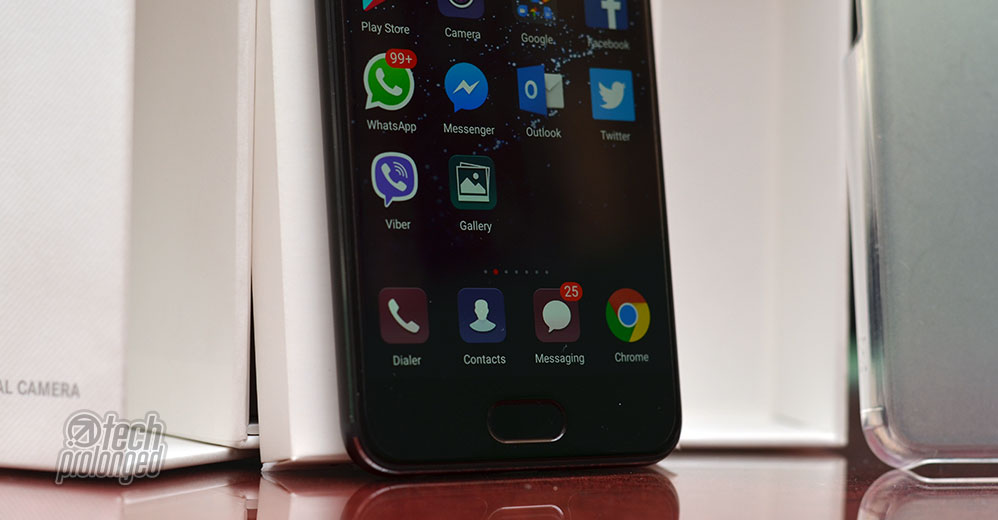
The Design
Huawei P10 is a followup improvement from the predecessors P8 and last year’s Huawei P9. The major change, of course, is the shifting of fingerprint scanner from back to the front. That also brought the multi-purpose home button on the front.
Clearly no objection on Huawei P10’s build quality and the finishing is done up to the mark. Sleek and compact size of the phone is for everyone out there. It’s just too good to hold with its appropriate slim profile and matte finish (the Graphite Black variant that we have here.) while other variants may deliver different feel with respect to their finish. Currently in Pakistan you get only two colors – the one that we have and the other one is Dazzling Gold.
Starting from the back of the phone, Huawei P10’s antenna stripes are going right into the direction of iPhone 7’s. Lining through the sides, they go right through the bottom and top edges on the back. That way, the top bar of antenna stripe goes just around the camera module from top. However, it’s very slim to mixed right into the black shade of the body.
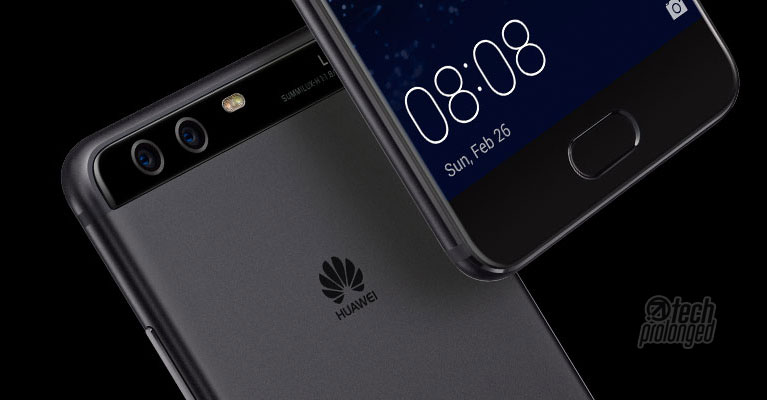
Similarly, the other antenna stripe go through the bottom edge on the back leaving no sign of interruption in between something. That top camera module covering the top fully wide is borrowed form P9 and it actually works to tell how visually appealing the Huawei P10 is – it indeed is a premium design, and build as well. On the front, we have a Gorilla Glass 5 covering the screen top to bottom with 2.5D curved edges.
Some say that Huwaei has been using taking recent iPhone designs for their smartphones which specifically include last year’s Huawei P9 and this P10. Well to be honest, you can tell that now most smartphone have similarities in design. To me, only the antenna stripes on this phone are the ones which go identically with iPhone 7. Huawei P10 has its own key design elements such as the prominent camera module on the back with Leica branding.


Regarding the size, Huawei P10 is good for most in handling. This sandblasted black model with matte finish is obviously great in handling. The build and finish material of a phone does matter in good or bad handling experience. Considering the fact, each model of Huawei P10 may give you different feel but I believe they will be equally good. Don’t take my words for the ceramic white variant.
Controls and Components
The home button (or the navigation key), as told, is multi function key that works with touch and swipe gestures in addition to taking fingerprints. You can turn off the navigation function for this home key and opt-in for an on-screen navigation like many other devices – detail in software section. The embedded fingerprint scanner under the navigation key is always-on and is extremely fast to act.
Parallel to that key and above the screen, on top we have an earpiece, an 8-megapixel camera and few sensors. There’s a small LED light as well for notifications that blinks with appropriate colors representing different kind of events.


On the back as already mentioned, there is an appealing wide module for the dual-camera setup and Leica branding with lens rating and model. In the center, there is dual-LED flash with a laser sensor below for added autofocus functionality in addition to sensor based phase detect autofocus (PDAF). This laser sensor is not visible in this black variant unless lighten up but you can see it in other variants with lighter color on the module. It’s simply similar in design with the P9.


Nothing there on the back else than the Huawei logo in the middle in place of a fingerprint scanner as used to be previously on Huawei devices.
Controls are just there on the right – the volume buttons and an intriguing “red” power key. On the left side of the phone there is SIM/microSD card slot. It’s a hybrid dual-SIM variant which users in Pakistan will get.


Dual-card tray can take “two SIM cards” or “one SIM card and a microSD card” simultaneously.
The phone has everything else on the bottom side – the 3.5mm audio jack, a USB Type-C port and a loud speaker. A mouthpiece (primary mic) is also down there between the audio jack and USB port. The top portion simply hosts a secondary mic for noise cancellation or stereo audio recording.


Even though the Huawei P10 sports a reversible USB Type-C connectivity, it uses the old USB 2.0 protocol. However the the interface works with a customized cable pins for proprietary fast charging (Huawei Super Charge.) This USB Type-C cable is also compatible with standard Type-C interfaces and can work with other USB Type-C devices.
The Display
On technical notes, Huawei P10’s 5.1-inch screen features an IPS-NEO LCD display which is manufactured by Japan Display Inc (aka JDI). It’s referred to be better than simple IPS displays serving with deeper blacks but not as much as an AMOLED display. Unlike most resent flagships by other manufacturers serving at Quad HD resolution, Huawei P10 still carries a 1080p display that delivers at the pixel density of 432ppi. Well that’s no doubt, more than enough for sharper content on the screen and most people won’t even bother to have more than this. Huawei reserves that higher resolution display for the larger P10 Plus variant.

Surprisingly, Huawei P10 comes with a screen protector pre-installed out-of-the-box. It’s not the temporary plastic film we are talking about – it’s an actual finished screen protector that you could normally use after buying separately or the one that usually ship in a retail box. But this specific phone has it installed on the screen right away.
The phone hover has a Gorilla Glass 5 protection for scratch resistance. It’s 2.5D curved on edges. A pre-installed screen protector film may lead some to decide to or not to remove the protector as the experience with that Gorilla Glass is way smoother than a screen protector on it.


Display quality, on the other hand, is also too good to have in dark or bright conditions. Company rates the phone to have brightness of up to 600 nits at 100% brightness. The screen performs better with black colors as well. But it’s reflective as well, however enough to beat the bright light outdoors.
Practically, I needed the maximum brightness levels on Huawei P10 only when outdoors under bright lighting conditions. When Indoors I normally used the phone at auto brightness in most of the times. But there were times when I found the auto level too bright to look at and I had to manually adjust the brightness to some lower level.
[nextpage title=”Software and User Interface”]

OS / Software
Huawei P10 runs Google’s latest Android 7.0 Nougat and on top it brings its updated software outfit Emotion UI 5.1 – that has been praised globally. I seriously don’t know why the world appreciated the latest software version of EMUI from the Chinese smartphone when they hated it most till its last version.
I personally never hated the EMUI as much as people did. Every OEM has its user interface with its different bit of taste. The noticeable factor is what EMUI 5.1 added that people loved? Only the app drawer shouldn’t be enough with some other bits of features. Was that praise only due to an ex-Apple designer involved into the development of EMUI 5.1? I do believe, this psychic is more likely to be the reason people started loving the EMUI.
App Drawer
As hinted about the app drawer – yes it’s the biggest feature that Huawei’s software lacked until its 5th iteration. However Huawei added the feature as an option for the users to choose. They can keep their older straight to home app icons or can adapt the traditional yet common app drawer or app launcher user interface. To be honest, I have been using the the old interface with all the apps on the home screen.
[videojs mp4=”https://onedrive.live.com/download?cid=182152EEBD704766&resid=182152EEBD704766%2176809&authkey=AIW98acDsPuZhC4″ loop=”true” autoplay=”true” preload=”auto” controls=”false”]
New Home key (Navigation key)
Simply touching the key once will perform as a back button and return to previous screen. While a long-touch (or touch and hold) will perform as a normal home key and will take you to the home screen. Either of the methods will be void when you are in a payment authentication interface or a fingerprint enrollment screens. Sliding left or right on the key will bring the recent tasks list and an additional gesture is off the key to launch Google app – simply swipe up from the bottom edge of the screen to launch Google app.
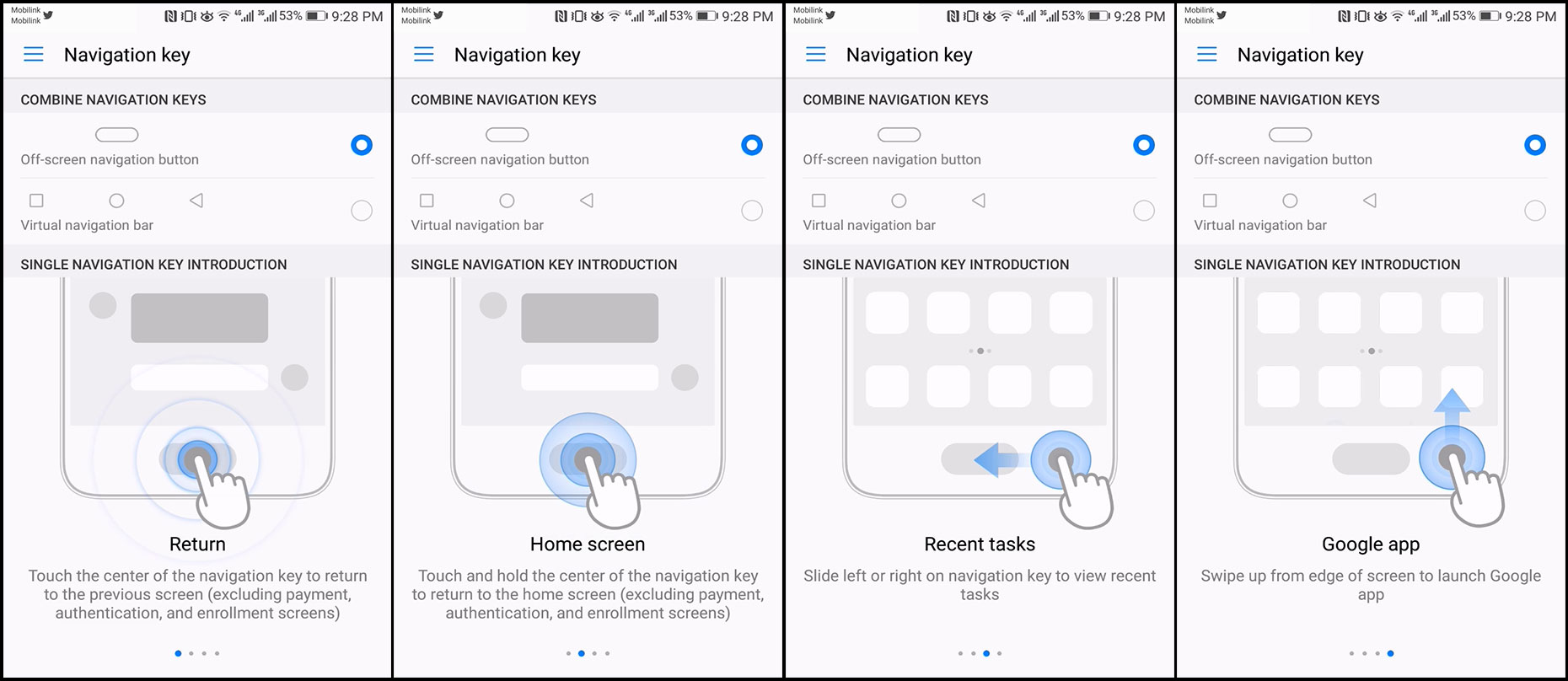
Or if you end up struggling with the different gestures of the navigation key (home button), you can simply turn it off to adapt standard on-screen navigation bar with back, home and recent tasks keys. This will leave the physical navigation key only to use for fingerprint scanner.
Lock screen follows from the previous versions with simplistic functions with magazine style – that greets with a new wallpaper each time you wake up the phone. The screens shows some standard stand-by elements such as a clock and date/time. You can set a privacy message on lock screen. A shortcut to camera is also provided on the lock screen. If the phone is locked with security-on, the camera app will launch but will not let you go through old gallery items.
When the shortcut functions are appearing with the likes of iOS bottom menu (swipe-up from bottom edge on lock screen) you can even slide through the backgrounds just to have quick look through the wallpapers. In those functions, you can control the wallpaper, pause it, remove it, favorite it or share it. As well, the shortcuts include to open recorder, calculator, flash light, stop watch, and a QR code scanner.


Fingerprint scanner is impressively fast here to wake up and unlock the phone, while taking you straight to the home screen. Home Screen – which most of the people knew EMUI to mimic the iOS user interface with all the apps deployed right on the home screens. It gets increased until you stop installing apps. People objected Huawei’s interface for not having an app drawer like many other OEM’s skins do have.
Listening to the community, Huawei added the most wanted feature on an android device – the App Drawer in EMUI 5.1, which first appeared with the Huawei Mate 9. Even though, now people can opt for an app drawer in Emotion UI, Huawei still wants you to use its standard home screen as it comes set by default. If you want to use that popular App Drawer, you can go to settings and change Home screen style to Drawer.


In the Drawer home screen style, you will get “Apps” icon in the middle of the sticky icons on the bottom. It launches the all apps list while the home screen will carry only the shortcuts to apps you want on the home screen. You can perform app search right there in the App list as well as you can drag on the alphabet scroll.
Like wise, a global search can be performed on the home screen (both, the standard or the one with app drawer) by a swipe-down gesture on the screen. Blurring out the content on the screen, a search box appears on top to let you search through the system such as calendar, calls, contacts, messages, etc.


Visually, you might not feel any difference from previous EMUI versions to the new one but only a few ones – the app drawer icon in the bottom set of icons on home screens along with a full fledged app drawer or app list interface, new notification area and the shortcuts in the top drop-down panel (the status bar).
Status bar, when exposed, shows a set of toggles on top portion with notification slices below. The toggles can be rearranged or customized according to your will. There is also a slight change in the user interface – the two screens on the right. A small buddy icon on top for multi-user system – the icon appears after once you have added an additional user (Settings > Advanced settings > Users). You can switch users instantly by just tapping and choosing a different user.


Huawei adds Android’s multi-user support with EMUI 5.1 that allows you to create multiple profiles on your phone. In addition, Huawei adds a dedicated Private Space for you. All these profiles support their own security features, everything on each profile is stored with encryption and no profile can access other profile’s content. Fingerprint authentication also works separately for each profile, but it’s not global authentication. Means, on the lock screen, only the fingerprint will be authorized whose profile was previously active. However you can switch to other profile from the lock screen.
Other interfaces of the system are mostly standard but one special item in EMUI is the Phone Management. It offers nice system clean up features along side some privacy and battery management. Virus scanner is also included by avast.


Motion controls come forward from previous iterations such as “Split Screen” can be initiated with knuckle gesture over an app. Features like Flip and Pick up are also there. Smart screenshot features multiple knuckle features to act, for example knock twice will take standard screenshot, drawing S with the knuckle will take a scrolling screenshot. To start screen recording, knock twice with two knuckles.
App Twin is a new feature in EMUI 5.1 that will let you use two session of particular app. For now it supports Facebook and WhatsApp. Means, you can sign in to two Facebook accounts and use them simultaneously. On the other hand, you can activate WhatsApp for two numbers on Huawei P10. Enable the feature by going to Settings > App Twin.


Despite that the app twin feature comes with EMUI 5.1, it’s not available on all devices running EMUI’s latest version.
Software Optimization
Huawei has also improved the operating system under the hood with two new new software agents — Ultra Memory and Ultra Response.
Huawei’s Ultra Memory technology along with machine learning, actively defragments and compress memory “to save space for more important apps according to your usage patterns.” Ultra Memory instantly recycles memory from unused apps.
Ultra Response, on the other hand, is a set of smart algorithms which include tools for faster touch response on the screen during the scrolling, accelerated multi-threaded to prevent lags. Scrolling throughout the system, according to Huawei, will now respond perfectly whether it’s in SMS messages list, emails, infinite scrolls on social media apps, news websites, etc.
[nextpage title=”Performance and Battery”]
Huawei P10 – Performance
Huawei P10 features the home built system-on-chip – Kirin 960. First boasted in the Mate 9, it’s bundled exactly with same configuration in the P10 and P10 Plus. Kirin chips have not been up to compete with Qualcomm’s boards whereas the latter always out performed in prominent difference. However, Kirin 960 has improved to tell something else.
On paper, the Kirin 960 SoC features an octa-core CPU with the configuration of two quad-core clusters. The chip has 4 ARM cores of Cortex-A73 clocked at 2.4GHz while the other 4 Cortex-A53 cores clocked at 1.8GHz. In the technical notes, the A73 processor core improves in power efficiency by 30% and when compared to previous design of A72. As well, the system performance is also increased by 30%.
On the other hand, the Mali-G71 is built on ARM’s Bifrost GPU architecture that is majorly marketed for high-end gaming and specially the mobile VR.
Practically, in real-time usage, Huawei P10 didn’t struggle to do anything whether it’s continuous video playback, visually rich gaming or whatever. Thanks to the premium G71 graphics processor, high resolution content has no impact in playback – it performed really better. Still performance trial can not be completed without the benchmark scores to know where a specific device in today’s date stands among the competition.
Starting off with Geekbench, Huawei P10 stands above all most devices while none of the Android is anywhere near the Apple’s board. Multi-core test, however, shows Huawei P10’s power with top numbers.


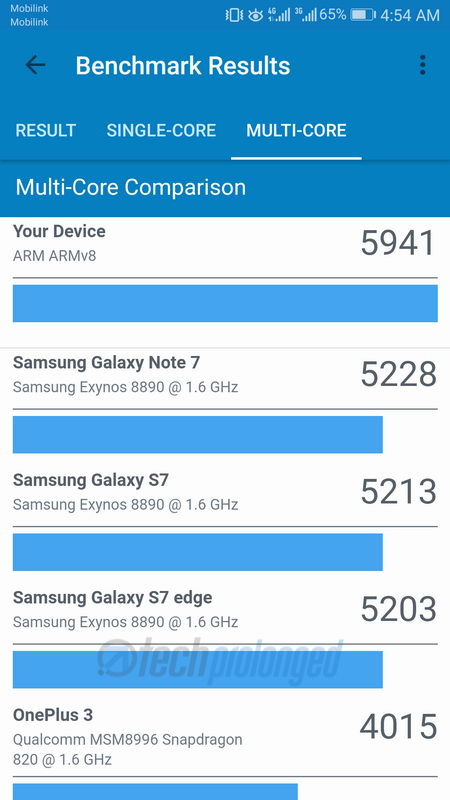
Basemark OS II is another system performance tester we have been using for quite a few years. Huawei P10 also didn’t fail to show itself with this test. Even though the graphics expert tool Basemark X also listed the Huawei P10 on top of the list.


Huawei P10 also showed better result in AnTuTu benchmark test while standing among top devices.


Battery Life
Huawei P10 is backed by a 3200mAh battery, which is not removable. Most impressive in power category is its real fast charger. The charger is capable of giving output power maximum of 22.5W in different categories – 5V/4.5A, 4.5V5A, and 5V/2A.
Like other manufacturers such as OPPO, Huawei P10 charger will also get the highest rating only when used with the retail USB Type-C cable. The cable has special pins that work out for that fast power transfer to the phone. Using another cable will drop the charging speed as well has switching charger will also do the same. In simple words, as long as you use supplied charger and USB cable with Huawei P10, it takes the battery from 2% to 55% in 30 minutes. Consider 2% as a base point, below that the phone will shutdown.

Huawei P10’s battery is also capable to last for 15 hours on a frequent test. With reasonably moderate use you’ll get almost a day with P10, but you’ll probably need to give it a full charge overnight. However, you will also need to keep away from long gaming and video playback if you want some juice for P10 to stay alive.
The last resort is the Ultra power saving which can provide you extra hours of life with basic functions of the phone.
[nextpage title=”Leica Dual Camera – Introduction”]

Leica Dual Camera 2.0
The dual-camera setup is a combination of a 12 megapixels color/RGB sensor and a 20 megapixels monochrome sensor. The module has Leica optics and both lenses have f/2.2 aperture. The configuration works like before – the system uses monochrome image data for better image detail, higher dynamic range as well as reduced noise levels.
Huawei P10 also has laser autofocus to assist the sensor based phase detect AF. This time, there’s optical image stabilization that works with the color sensor to provide steady video footage as well as better low-light shots with a longer exposure. Technically with system settings, the OIS is set to go as slow as 1/17th of a second, however you can manually go further down to 30 secs if you have enough steady hands or you want to use a tripod.
In video mode, Huawei P10 offers up to 4K (UHD) recording as well as 1080p/60fps is also an option. The software based stabilizer is also present for videos up to 1080p/30fps.
Camera Operations
Huawei P10’s native camera app has not changed a lot as compared to the predecessor P9. Some cosmetic changes are present but it got a plenty of quick toggles right along side the viewfinder. In addition to “Wide Aperture” (formerly Aperture Mode), a new Portrait Mode detects faces and create an artistic bokeh on the background.
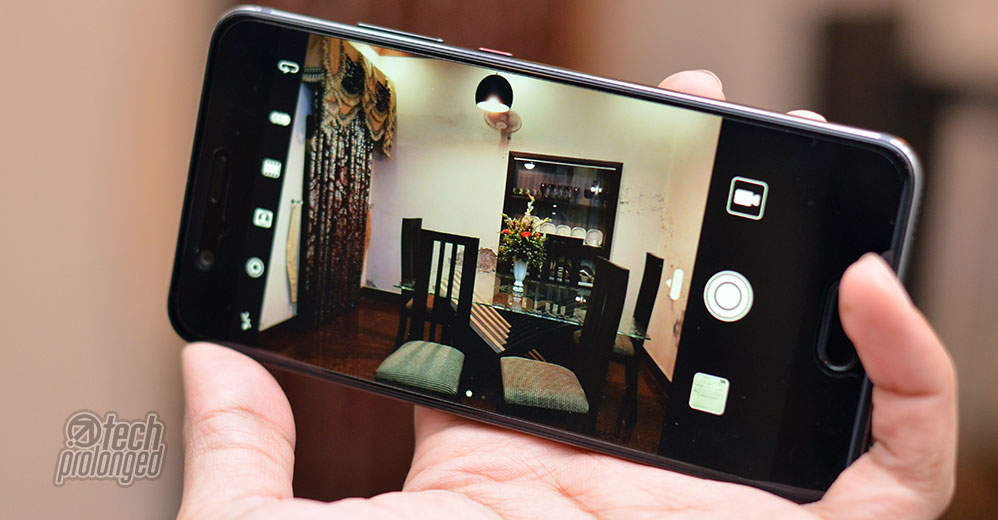
A virtual shutter button is on one side with the gallery and video switches while on the other hand there’s a set of toggles – front/rear camera switch, filter options, color settings, Portrait mode, Wide aperture mode, and flash settings.
From the right side, pull out the “PRO” settings which allows you to configure metering, ISO, shutter speed, exposure compensation, manual focus and white balance. All those settings can be adjusted through a virtual slider.


Taping on the screen focuses the subject as well provides provide option to set exposure for a certain lightning condition. A virtual slider is provided along side the focus point (the focus circle) to manually adjust the exposure compensation.
With all those quick access features, the Huawei’s camera UI is more intuitive than what has recently been offered by competitors. This interface is equally useful for both, a standard user or a more professional enthusiastic.
Swiping right on the viewfinder brings a lot of camera modes including Monochrome, HDR, Panorama, Night Shot, Time-Lapse, Slo-mo and more. Right on the mode screen you can see an ¡ (information) icon which explains each of the mode in detail. Swiping left reveals the settings which are dependent on the mode you are currently in.


You can set to take 20MP large color photos but 2x lossless zoom is only available when capturing 12MP shots. You can go additionally up to 10x zoom but that will be common digital zoom.
[nextpage title=”Leica Dual Camera – Features”]
Wide Aperture
You are most familiar to a photo with blur effect on the background while the subject remains sharp in focus. Huawei introduced the feature in Huawei P9 that allowed to simulate variable aperture effect. With other improvements, Huawei P10 brings some more into the feature having it renamed to “Wide Aperture”
The variable aperture allows you to simulate aperture between f/0.95 through f/16. However the resolution is fixed to 12MP, you can not change it. 2x Zoom is available here
Previously the feature allowed only to use blur effect in editing, now it adds filters which allow you to use different effect on the background and not just blur effect. Some of these are pencil sketch, comic, monochrome.


Portrait
Unfortunately, the feature still lacks the usability of PRO settings like before but another feature Portrait is added which uses the same aperture system to simulate artistic bokeh on the background while shooting a portrait. This feature comes with beautification to adjust the skin smoothness.
Monochrome
Even though the monochrome sensor is there to produce highly detailed color photos when combined with the RGB sensor data, It’s good that Huawei P10 provides real monochrome images as well using the sensor. It’s not that what usually smartphone cameras do to desaturate photos for black and white photos.
Interestingly, PRO features are completely available when shooting in Monochrome mode so that’s a good thing Huawei manages to keep all the features available in different modes as much possible. In fact, we can use Wide Aperture and Portrait features as well in Monochrome mode.
Panorama
Panorama function in any smartphone works pretty much the same way by panning the phone in a direction while the camera identifies the scene and captures every next photo, then stitch them together to produce a wider photograph. Difference comes in as how much wider the panorama can go through and what resolution the camera produces when photos taken in panoramic view.
Huawei P10 covers around 180° angle of view in panoramic mode which is not so competitive in its class. But the image detail is impressive at 100% crops as well as stitching errors are fairly low. The system manages to take care of moving subjects as well.
[nextpage title=”Leica Dual Camera – Image Quality & Performance”]
Camera Performance
The hardware within Huawei P10 is sure making things easy for the camera to perform really well. The octa-core Kirin 960 has already shown its overall performance along with the support of 4GB RAM. That seems to help camera as well as cold start of the camera is faster and improved that takes less than a second.
Additionally, the autofocus is impressively fast in almost all lighting conditions. Huawei P10 mostly did well even in low-light conditions with locking onto subjects instantly. Throughout our tests, we didn’t get a single shot that is out of focus – excluding some unexpected clicks.
But the battery is somewhat that’s not friendly to the camera. If you are a camera guy, and usually keep your smartphone in your hands while walking around, you are supposed to have extra battery pack or power bank to get the Huawei P10 recharged. Another thing we noticed, that P10 gets warm when using camera and that’s even badly warm when out in bright sunlight.
Image Quality – Daylight Outdoor
Let it be short, we are impressed with the shots in good light. Under bright or good enough light outdoors, using low ISO speeds, Huawei P10 captures nice exposures with vivid colors which are not unnatural to look at. Dynamic range is really good too which probably didn’t make me feel to turn on HDR in many cases. The dual-camera takes care of the white balance in almost all situations.
After examining the shots, we can tell they are nicely sharp across the frame. As told, in good light we are impressed, Huawei P10 is managing noise in excellent way, the images are very good in detail with almost no artifacts around the edges. But that makes some low-contrast shadowed distant objects mixed up in detail – probably due to noise reduction. Even though some luminance noise is noticeable in some areas, overall performance of Huawei P10 in bright light is undoubtedly top notch.
Image Quality – Lowlight
Huawei P10’s camera is good enough to capture nice color, white balance and exposure, throughout the ISO range. Due to higher ISO levels noise becomes more visible as well as the side effects of noise reduction but P10 manages to balance between retaining image detail and noise reduction.
As told above, the camera goes down to 1/17th sec shutter speed in auto settings as well as when you manually control ISO. Due to camera-shake issues, the camera restricts auto settings at 1/17th sec. But if you want you can manually take down the shutter speed to 30 seconds. However the OIS performs good with the restricted shutter speed level.
With everything that could effect the camera performance in low-light, P10 manages to deliver excellent results at its best.
Here are some night shots with auto and manual control overrides. A photo with white horses was taken twice – ISO 400 and ISO 200 in those two photos can easily be differentiated with their exposure and noise levels. Overall these shots were visually appealing and Huawei P10 delivered pretty awesome output. Two long exposures were taken with “Night Shot” mode of the camera.
Image Quality – Flash
While using the flash with a smartphone camera is something I hardly found useful to take some good low light shot. As long as the flash doesn’t destroy the natural colors and skin tones of the subject, it’s better to use it. The one in Huawei P10 has enough power to lighten up the whole subject and a little around it while keeping the ISO levels low. The flash is well under control to avoid highlight clipping.
Front Camera
Huawei P10 features 8 megapixels camera but has a wider f/1.9 aperture lens. Screen flash is improved to maintain skin tones. The camera supports an widening frame feature – that occurs automatically when the camera detects more faces in the frame. This thing mostly gives an impression of an intelligent camera.
Previously, wide aperture mode wasn’t available with front camera – well it’s still not available exactly, but the similar Portrait mode can be used with the front camera. Front cameras are usually just a quick sharing tool of your selfies or a video calling, the one in Huawei P10 produces some better images.
[nextpage title=”Leica Dual Camera – Image Gallery”]
Huawei P10 – Camera Photo Gallery
[nextpage title=”Verdict/Conclusion”]
Conclusion
Taking the P9 up to the level of a smartphone that is now Huawei P10, we believe it’s a nice upgrade with appealing design, much better hardware. Even the phone has improved camera with the branding Leica Dual Camera 2.0.
Huawei P9 is really a fast smartphone with its Kirin 960 processor, more specially with the support of Mali G71 graphics processor. Huawei has done a pretty much good job. If this set of platform wasn’t running the P10, it couldn’t have performed with its brilliant camera as well.
Considering camera, Huawei P10 has pretty impressive imaging features and performance as well. Video shooters can go competitively close to each other in smartphones some would be better than Huawei P10 but if you prefer still photos more than P10 is one of your best choices. In low-light, take our thumbs up for P10, specially as you can have more control over it.
If you are looking for a straight line, then yes; it’s a worthy upgrade if you already have last year’s P9. You’ll love have higher resolution camera that can record up to 4K resolution footage. P10 also has a 2x lossless zoom (that’s not technically an optical zoom).
On the bad side, let me tell you here, the portrait mode and wide aperture feature on front camera are not quite good enough to use. Simply I’d keep them off for some better selfies as they will rather spoil your moment. f/2.2 lens aperture is way narrower than the one in iPhone 7, however Huawei used the brighter f/1.8 lens in the larger variant Huawei P10 Plus.
The P10 is Huawei’s flagship phone standing in the top shelves among the likes of Samsung Galaxy S8, LG G6 or even iPhone 7 and iPhone 7 Plus. Galaxy S8 and G6 would sure have up hand with their features like larger and high-res screens, added biometric features, water and dust resistance etc. Huawei P10 focuses on its camera and sure it could compete easily with all those devices.

Put the iPhone 7 aside, but 7 Plus sure has camera features that are pretty much more impressive than Huawei P10’s – specially the portrait mode. Huawei has to work on the feature has they know it’s their feature and they have to keep it compelling.
After all the odds, however, if you want to buy some less pricey premium smartphone, you can pick Huawei P10. That should rather be an easy job for you to decide, if you are coming from Huawei P9.


