


[nextpage title=”Overview and Technical Aspects”]
Overview and Technical Aspects
A review of Nokia Lumia 1020 has already been published. What was left is the main factor for what the Nokia Lumia 1020 was hyped so much and that is its camera with 41 megapixels sensor inside.
Windows Phone, 41 MP, Optical Image Stabilization
The Review: Nokia Lumia 1020 PureView

As mentioned earlier the camera module is bundled with the most of it in the smartphone category. 41 megapixels BSI sensor serves full available width and height of the sensor in 16:9 and 4:3 aspect ratios respectively. That says, all 41 megapixels won’t be available for shooting but the concept of making larger sensor is what Nokia is putting into its flagship smartphones since the introduction of original PureView branded Nokia 808 PureView.
True Multiple Aspect Ratio
Nokia Lumia 1020 equipped with 41 megapixels sensor that serves a little bit less resolution than Nokia 808 PureView’s 41 MP. 4:3 mode photos will contain 38.2 MP (7136×5360) and 16:9 mode photos will contain 33.6 MP (7712×4352).
This sensor makes use of full width and height of it within the standard 16:9 and 4:3 optical areas respectively. Unlike that, other image sensors in most smartphones contains exact amount of pixels to shot with. For example a common 8 MP camera makes use of full width and height in a shot of 4:3 aspect ratio but in 16:9 mode, instead of giving wider field of view, it will crop the same 4:3 image from top and bottom to make it 16:9. That is, you end up with the same widths in both the 4:3 and 16:9 modes when shoot with a common 8MP camera smartphone.

So in result, with the sensor like illustrated above, the effective resolution of final pictures shot with Lumia 1020 will be 33.6 MP on 16:9 aspect ratio and 38.2 MP on 4:3 aspect ratio. You get wider field of view horizontally in 16:9 mode and larger field of view vertically in 4:3 mode. And that’s what Nokia calls it “true multiple aspect ratio”, and we believe it too.
Following image will give broader explanation about the differences of field of views from different smartphones with their different aspect ratios.

As you can see the “red” and “green” outline the Lumia 1020’s field of views in 4:3 and 16:9 aspect ratios respectively. The field of views from Galaxy SIII with “purple” and “blue” outlines remain the same at width. In addition you can clearly see the field of view from Galaxy SIII is a little smaller than the Lumia 1020’s 4:3 view. That’s due to the focal length of Lumia 1020 being 27mm bigger than what Galaxy SIII’s; that’s 28mm. In 16:9 mode, Lumia 1020 provides a focal length of 25mm.
PureView vs PureView
We have seen many contenders from Nokia itself as well as other manufacturers which directly compared with the original Nokia 808 PureView (detailed camera review) but none of them could have actually beaten it in numbers. What caused Nokia 808 PureView couldn’t get enough push to be successful was the platform it was running on – Symbian. Specially when Nokia had already decided to abandon the long running operating system and partnered with Microsoft adopting Windows Phone OS on their hardware. However Nokia 808 PureView did get appreciations for it’s unique and pioneer camera hardware with new concept of oversampling, people showed interests in something like same with Windows Phone OS. With that target in mind Nokia first launched Lumia 920 running Windows Phone 8 with the PureView tag on it and introduced first ever Optical Image Stabilization (OIS) in a smartphone which attracted photography enthusiast but couldn’t replace the title what Nokia 808 PureView had been labeled.

Following the same target to achieve the photography power in their smartphones, Nokia finally introduced Nokia Lumia 1020 last year which actually brought competing camera hardware with again 41 megapixels sensor from Nokia 808 PureView as well as the OIS from 2nd PureView product the Lumia 920. We can tell Lumia 1020 actually put a period on the questions that raised after Nokia 808 PureView and let you think Nokia has beaten its own pioneered camera smartphone with another. We have seen sample shots from Lumia 1020 which are actually promising as well as reviewers have also have gave their point of view if Lumia 1020 can now stand against the Nokia 808 PureView. Well that’s what for which we have a chance to see ourselves right here, right now.
[nextpage title=”Features and Specifications”]
Features and Specifications
We are not going to compare both devices directly but following are the specifications of camera modules from both devices which can help you make an idea about the little differences.
| Nokia Lumia 1020 PureView Lens & Sensor | Nokia 808 PureView Lens & Sensor |
|
|
After experiencing I can tell that Nokia really took care of the build of Lumia 1020 with the following things in mind, to put as bigger resolution sensor as it was in Nokia 808 PureView, keep the device as much slim as people won’t have an excuse of rejection. So to keep the device slim Nokia used sensor of size of 1/1.5” that is smaller than Nokia 808 PureView’s 1/1.2” sensor.
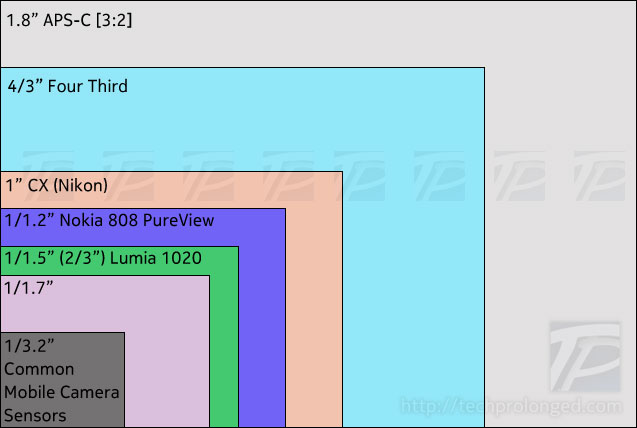
Chart showing the sizes of the sensors of Nokia 808 PureView’s 1/1.2″, Nokia Lumia 1020’s 1/1.5” in comparison of those found in compact cameras and the one commonly used in mobile phones.
Well smaller sensor with the desire of same resolution as of 808 PureView’s, also restricted Nokia to use smaller pixels size. So with smaller sensor size and then smaller pixel size, theoretically the Lumia 1020 won’t be able to reduce as much noise as Nokia 808 PureView did, however should do great in comparison with other smartphones. As well the addition of Optical Image Stabilizer in Lumia 1020 will do much better with steadiness in low-light when slower shutter speeds are used as well as it also helps reducing digital noise at much extent. Other creativity also comes along with slower/longer shutter speeds. We’ll see in the later section below with the camera operating interface and options.
Bigger on the Back

If it suites your photography desires, then you won’t feel any bad with the big camera housing on the back of Lumia 1020. The big circle extruded on the back contains all-in-one camera components including single LED bulb to support video recording in lowlight when indoor with a small range. It also can be used for torch light in dark. Xenon flash for still photography indoor when needed in low-light to freeze a moment or to fill the deep spots. Carl ZEISS lens with OIS is perfectly noticeable when moving to keep the image steady.
Enough Technical Side
I really believe there has been enough technical information about Lumia 1020’s camera. we should be going forward with the camera user interface and photo/video results for end-users
[nextpage title=”Nokia Camera & User Interface”]
Nokia camera & User Interface
Windows Phone 8 normally comes with a standard camera UI in every low-end or high-end smartphones but Nokia has their own camera app with distinguished user interface for the devices with PureView tag. First known as Nokia Pro Cam, later became Nokia Camera, was made available for high-end Lumia devices lately.
As for now when Lumia Black software update has started hitting Lumia devices globally, the Lumia 1020 in our hands has also been updated in between the process of reviewing. So I’ll try to differ the available and possible options and factors before and after the Lumia Black update applied.
For most users default Windows Phone 8 camera app should work fine as well as Nokia Camera with automatic settings. But if you want to do more with the Lumia 1020’s camera with huge pixels count then you must use Nokia Camera app, I must say. “Nokia Camera” has been reviewed in much detail with Lumia 925 previously for its capabilities to shoot with some photography enthusiasm and knowledge of handling the camera manually.
Manual Control:
Prominent factors in Nokia Camera app with Lumia 1020 are the manual control over ISO sensitivity, focus and shutter speeds. ISO can be controlled through 100 to 4000 where the shutter speed can be as slower as 4 seconds long. Long Exposures are pretty much useful in plenty of situations.

Comparatively the control options are not as much as you can find in Android’ camera UI, however the Manual Control in Lumia 1020 surpasses any other smartphone with the the option to control the camera completely according to your desire. Such as longer shutter speed can let you record a still scene for up to 4 seconds long to get as much light through the lens to the sensor for some shots like the one below.

Manual, ISO 100, exposure 4 sec.
Well, it’s for sure, that none other smartphone can stand with its lens like above open for that much duration. Lumia 1020 equips with Optical Image Stabilizer which is as much better with steadiness as high-end lenses on DSLRs. With shutter speed of 1/8th of the second can give enough good shot while hand-held avoiding serious camera-shake issues. However shots like above will need the Lumia 1020 to be put away on something or on a tripod to avoid camera shake – details are provided later below in the samples sections.
Most smartphones may go down for shutter speed to 1/15th of a second in low-light with higher ISO sensitivity to get some light on the sensor, which end up with an unusable picture with much digital noise enough to overlook the image. Above picture can not be captured with any other smartphone for now. You can compare the following two photos.
iPhone 5 iOS 7, auto (Left) – Lumia 1020 Manual (Right)
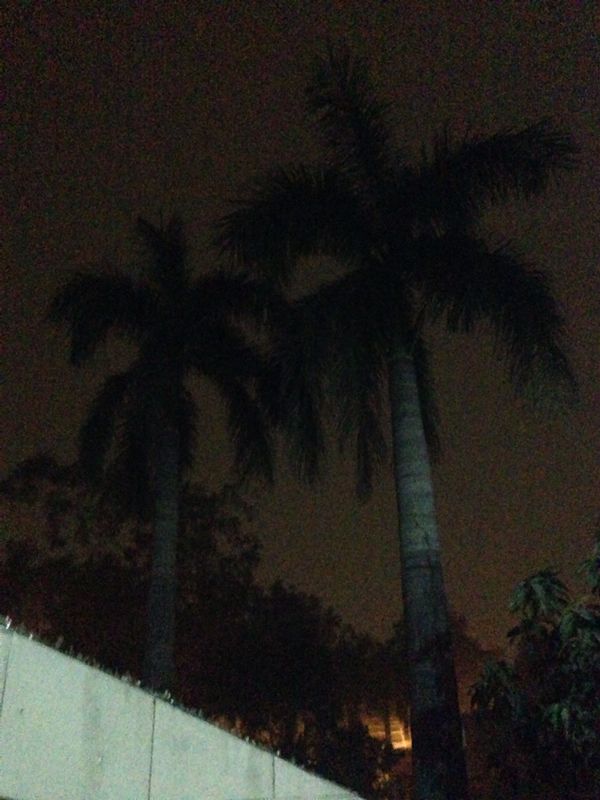
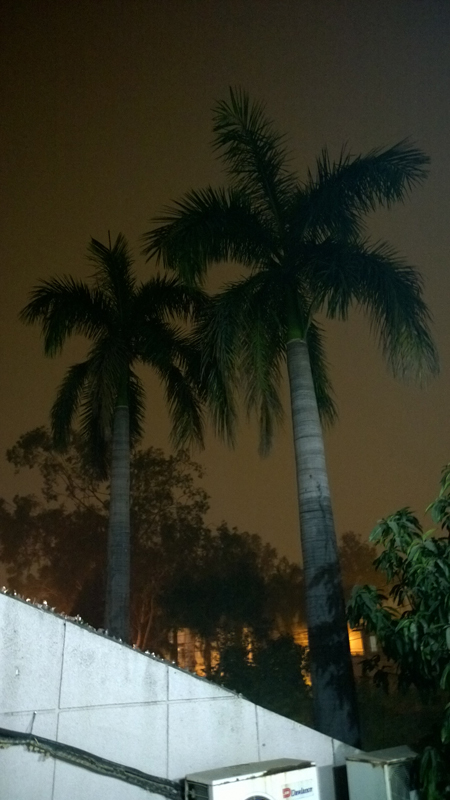
There is no manual control on iOS 7’s camera UI, hence the picture was completely taken with its camera while the picture form Lumia 1020 was manually controlled.
Nokia Camera App Settings:
Settings on the Nokia Camera app are straight forward just like the native Camera app, however a few more options with the core settings. Main settings menu can be turn in with tapping on the three dot “…” icon on the side of the live view. Direct option to switch to another camera app “lenses” is provided on the top and the front/main camera switch on the second.
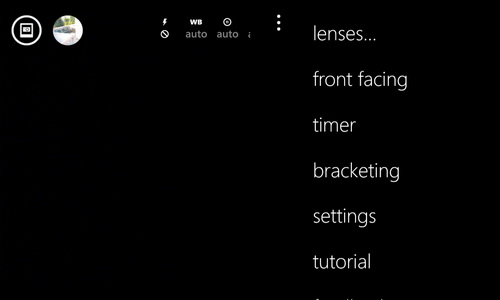
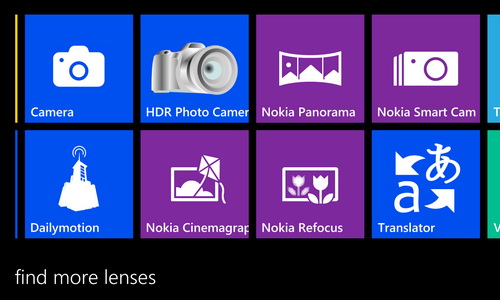
Later camera settings depend on the camera you have enabled “front” or “main” camera. Following settings are from the main camera as we are dealing with the real camera.
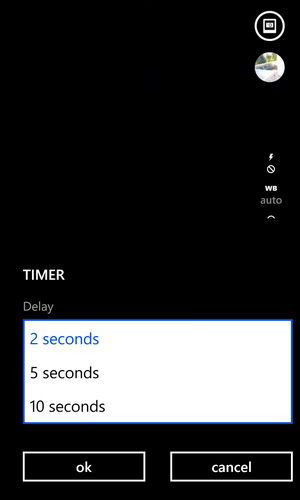
Shutter delay can be set from 2, 5 or 10 seconds from the option “timer” on the main menu list.
Native camera app on Windows Phone does not offer HDR capturing. Even pro Nokia Camera app on Lumia 1020 doesn’t make HDR images instantly after taking the shot but it does offer “bracketing” for the purpose.
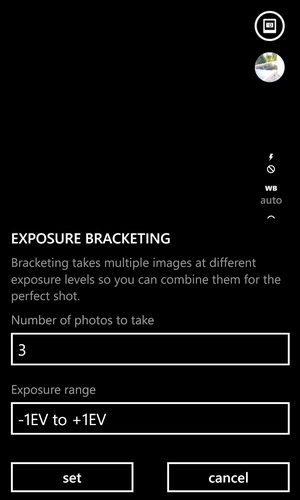
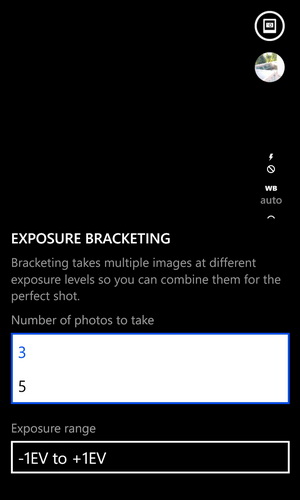
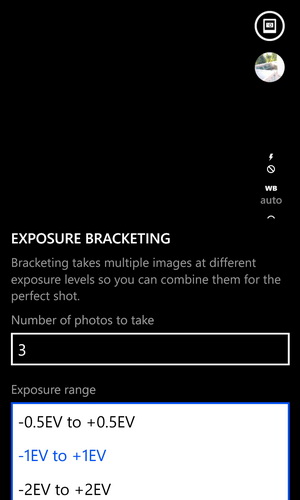
Bracketing allows you set “number of photos” as 3 or 5. Normally 3 are good for HDR processing. Secondly you can change the “exposure range” from “-0.5EV to +0.5EV”, “-1EV to +1EV” or “-2EV to +2EV”. Normally default middle option is good for HDR processing. Nokia Camera will produce 3 images with 3 different exposure values which you can bring on your computer with some software for HDR processing. Some of them free are “Luminance HDR”, “Picturenaut”, “Fusion HDR” or you can search the web for free HDR processing softwares.
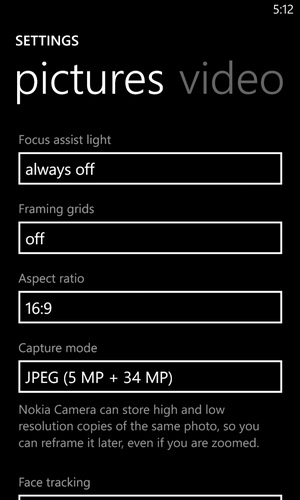
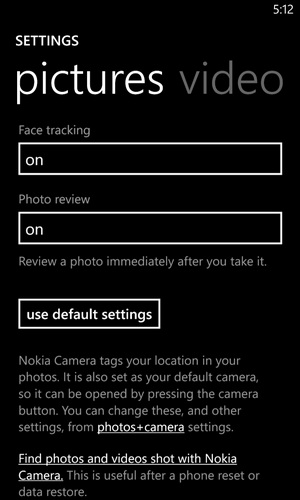
Later on the menu you get “settings” for pictures, video and smart sequence. “Pictures” settings let you turn on the focus assist light on or off, gives you framing grid of your choice on the live view screen, let you change the aspect ratio between 4:3 and 16:9, and the major one “capture mode” that you can select from “JPEG (5 MP)”, “JPEG (5 MP + 34/38 MP)” and “JPEG (5 MP) + DNG (34/38 MP)”. Face tracking is also featured in the app and you can turn off/on the instant photo review after the capture.
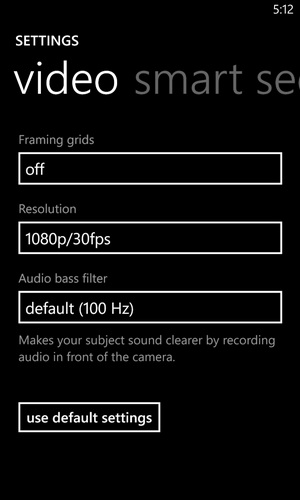
“Video” settings offer framing grid as well. Resolution can be changed between “1080p at 30,25,24fps” and “720p at 30,25,24fps”. Additionally you can set audio bass filter from 100Hz and 200Hz or turn it off at all.
Nokia Camera or Pro Cam Operations:
Simply by long pressing the camera shutter button on the phone launches the Nokia Camera app which is of course better than the default/native camera app on Windows Phone. You can start shooting with it just straight away. Half-press the shutter button to acquire focus which also locks the exposure and engages the optical image stabilizer in the phone. As soon the lock is made and focus is acquired you clearly notice the preview image floats eerily steady on the live view screen. Pressing the shutter button all the way down will take the picture.
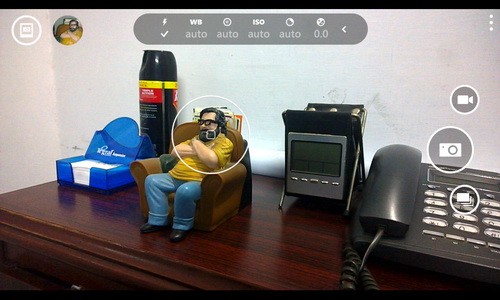
Tapping anywhere on the live view screen moves the focus point to that tapped potion as well as it biases the exposure according to the portion of the frame you tapped on; well that’s the way it should work.
That’s it, as I told above. It’s just straight away to point-and-shoot with auto control settings on Nokia Camera app. But if you are some kind of enthusiast and want to play with manual controls, the Nokia Camera is just for that purpose rather than being just an auto shooter.
On the top of the live view screen, the Nokia Camera app plots a row of icons with preset values shown under them. Some of them are easily recognized that include flash, white balance, ISO and exposure compensation. In between them two are just unfamiliar to any other phone but surprised on the Nokia Camera app specially for their high-end Lumia smartphones which comes with the PureView tag on the back. Well they offer the manual control over focus and the shutter speed which can not be found on any other phone.
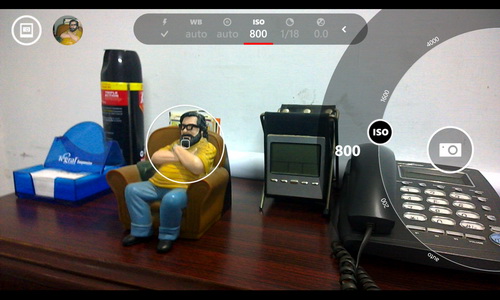
Tapping on any icon on the top row expands the control wheel from right surrounding the soft shutter button on the screen. You can use thumb to move on the wheel for your desired value. The more exciting fact is the relation between ISO and the shutter speed. Nokia Camera balances the shutter speed automatically when you change the ISO speed That’s what the dedicated cameras do if you are familiar with and that’s impressive to be on a phone. The Nokia Camera app reports the balanced shutter speed with your desired ISO speed so that you can know very well if it’s fast enough to avoid motion blur. If it is not, you can simply increase the shutter speed and let the app decide the correct ISO speed for it. In fact you can manually control both of them if you are sure you are doing it right.
All the control wheels can be expanded at once by dragging the soft shutter button on screen slightly to the left. That’s also useful as changing the values effects on live view screen so you can select correct values on the correct wheel just side by side.
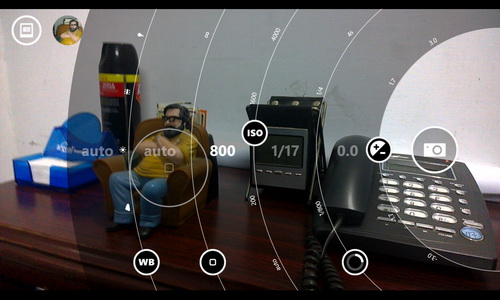
Again unfortunately, Lumia 1020 doesn’t offer red-eye reduction in flash mode. You can set it to auto/on/off.
On screen shutter button is available for those love tapping the screen to capture a shot on the phone, I however prefer the two-stage hardware shutter button on the phone in most situations. The on screen shutter button can also be useful for soft touch to give relief to the device from undesired motion blur when slower shutter speed is used. A 2 or more seconds shutter delay “timer” could be useful in such situations.
Video Recording:
Along side the soft shutter button on the screen, there is the “Video Camera” icon to switch to video mode where you just can start recording the video. There is no manual control on the video mode other than the focus. You can set it at some fixed focus point when required or you can leave it to auto for continuous autofocus during the recording is in progress. Best thing is that you can zoom in and out while the video during the recording is on, that some kind a feature which is not present on other phones. Nokia 808 PureView was the first to introduce the zooming feature during the recording. Another thing is that you can’t pause the recording in between. Soft recording button turns on when you start recording and tapping it again will stop recording and save the file. A new video file will be created on next recording start.
Smart Sequence:
Another soft button on the screen with the still camera and video camera icons, a smart sequence soft button is provided which takes the shot and take you to Nokia Smart Cam. Read later below about Nokia Smart Cam after the break.
If you don’t like the guts of Nokia Camera app or you just don’t want to mess up with the manual settings of the camera, you can just use the native Windows Phone Camera app from your applications screen. You can even set the hardware camera shutter button to open native camera app instead of the Nokia Camera app in your phone’s “settings” > “photo + camera”. But make sure, you will get only 5 MP images from the native camera app and will not be able to use the full sensor power of Lumia 1020. Also what you zoom-in in the native app, that’s final. You can’t get benefitted of what Nokia Camera calls it “reframe” – read it below. I prefer you to use Nokia Camera (aka Nokia Pro Cam) even if you don’t want o use manual settings, it does much better even in auto mode than the Windows Phone’s native camera app.
[nextpage title=”Post Editing and DNG Raw Support”]
Recompose or Reframe:
One of the beautiful things is the possibility of re-composition of the shots you have already taken. A photo captured with Nokia Camera can be opened instantly after taking it or later to reframe or rotate the photo as you wish. Reframing also provides easy access to recompose the picture on four standard aspect ratios including 4:3, 3:2, 16:9 or 1:1(square)
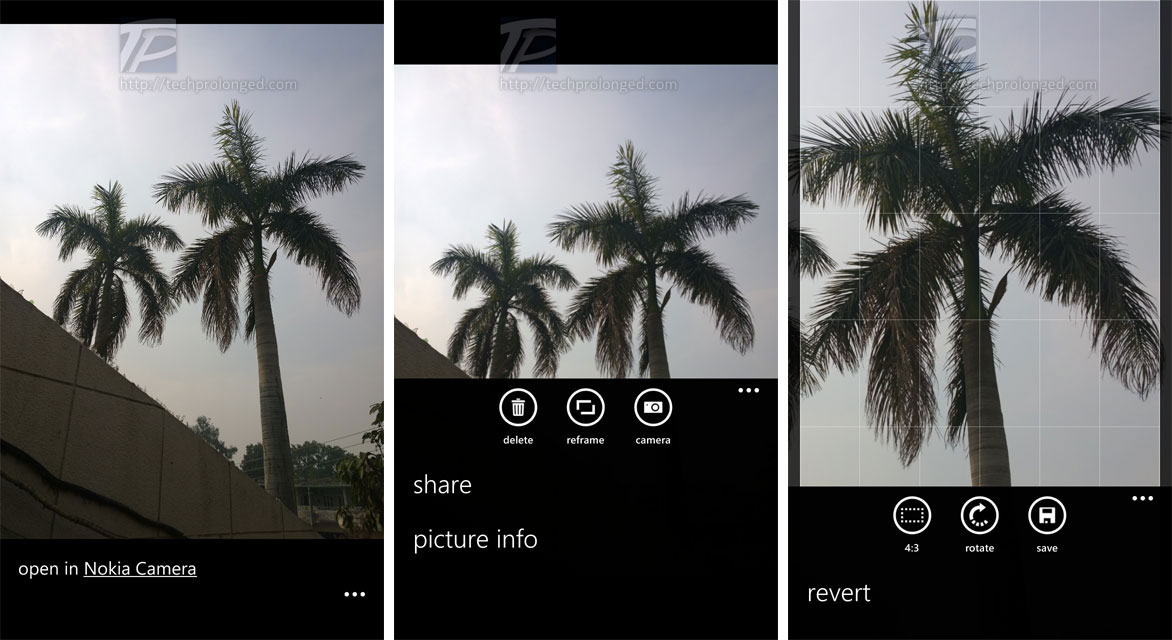

Option to reframe photos becomes available only if you are shooting in full resolution of the sensor “JPEG (5 MP + 38 MP)” for 4:3 aspect ratio or “JPEG (5 MP + 34 MP)” for 16:9 aspect ratio. Other 5MP mode or DNG (Raw) mode won’t give the reframing option.
Reframing or rotating would save 5 MP file while reserving the full resolution file intact for later reframing or rotating.
The option is cool actually when you zoom into some object in live camera view which capture the zoomed in photo in 5 MP file to share away, that’s the view which opens in Nokia Camera for reframing. If you feel you have zoomed too much, you can just open the photo in Nokia Camera and zoom out.
That’s what Nokia Camera does while shooting a photo in 5 MP mode along with full 38 MP resolution. Any interaction with zooming on live camera view is only performed on 5 MP file while the 38 MP image is captured in the full field of view (without any zoom). That means even after you have shot a zoomed-in photo, you can zoom-out later.
There is a need to mention that when zooming in on live camera view, it may effect the contrast, white balance, ISO sensitivity and shutter speeds according to the zoomed-in view field. For example if you take one shot without zooming in on tree like above with full bright sun shine, the exposure will be adjusted to the bright light on the sky with faster shutter speed and lower ISO. The second shot with zooming into tree fully will avoid any background light and the exposure will be adjusted to have a clear view of tree. When you reframe and zoom-out this photo, you will see that the sky on the background will be overexposed. That’s because the exposure was set on the tree.
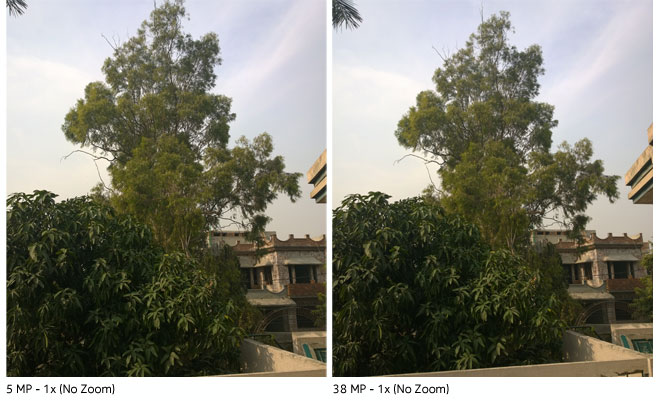
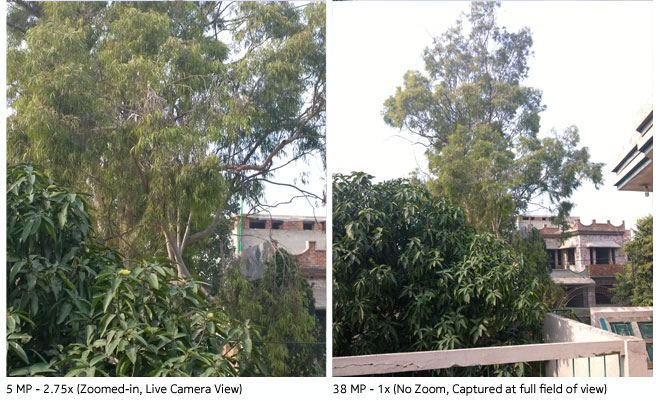
Above shots were taken at the same time, one after another. The left two pictures were taken by Nokia Camera without zooming into tree, 5 MP for sharing and 38 MP high resolution for later use. Now look at the other two shots on the right. This picture was shot with zooming into maximum available zoom 2.75 (although not mentioned on the screen). You can see nicely exposed tree as it was in real with the bright sun light. Reframing such an image to zoom-out will give you over exposed sky on the back ground as shown in the 38 MP image on right.
Now look at the following picture after reframing/zooming-in the above left photo in post-capture Nokia Camera. Beside the picture on right is same as above shown zoomed-in, pre-capture. You will see the difference of both.
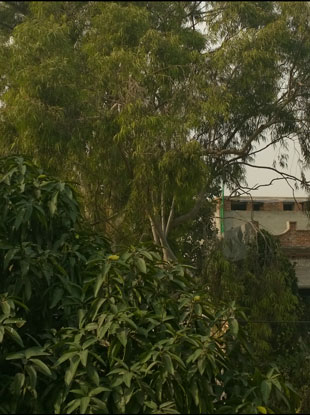
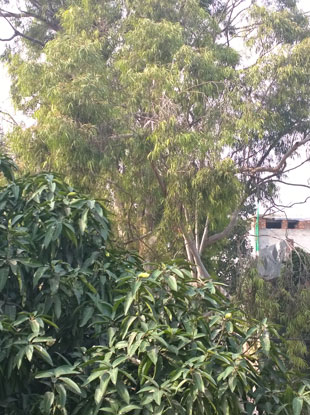
Actual Resolutions (left) no zoom during live camera view [5MP no zoom, 38MP no zoom, 5MP-Reframed]
Actual Resolutions (right) with zoomed-in at live view [5MP zoomed-in, 38MP no zoom]
DNG/Raw Image:
For photography enthusiasts, the Nokia Lumia 1020 provides support of Raw images for post processing. Lumia 1020 was initially released without this support but recent software upgrade “Lumia Black” brings not only camera improvements but also brings support of Raw images with DNG file format. Nokia Conversations has published DNG color profiles for Adobe Lightroom.
Well for end users, there is nothing to tell more about it in detail but for your knowledge, Most DSLRs produce image files in Raw format (uncompressed) that’s not actually a usable image file. It requires to be processed by your computer with a special software e.g. Adobe Lightroom with extensive raw image processing functions or Photoshop for basic processing. Whereas .DNG is Adobe’s digital negative format, most Camera/DSLR manufacturers produce their own proprietary Raw file formats (Nikon’s .NEF, Canon’s .CRW/CR2 etc ). Nokia chose .DNG for its Raw file format.
An uncompressed Raw file size in megabytes typically be equal to the megapixels on the image sensor. Nokia Lumia 1020 produces ~41 MB .DNG (Raw file) that is complete lossless data from the camera’s sensor on the smartphone.
You must give a try playing with it.
Nokia Smart Cam and Other Lenses
Nokia Smart Cam takes burst shots in sequence and presents you with the 5 functions to edit, improve, enhance and professionalize the final image. The functions include “Best Shot”, “Action Shot”, “Motion Focus”, “Change Faces” and “Remove Moving Objects”.
[nextpage title=”Nokia Smart Cam and other Camera Apps/Lenses”]
Nokia Smart Cam:
With Nokia Lumia 1020, Nokia Smart Cam takes 10 frames in around 2 seconds. “Best Shot” function lets you review the shots and simply keep the one you find best.
With “Action Shot” feature you can make a crowd like photo in a scene with isolating moving subjects from the still objects. Moving subjects can then be filled with their still appearances in each frame taken.


“Change Faces” works well to operate on the faces that are commonly found with closed-eyes or open-mouths. The feature lets you find better face views from a sequence of photos and change accordingly in the final image.
“Remove Moving Objects” can also be important feature for photos where you think the unexpected entry can easily be spotted in the frame. Any unneeded moving object can be removed from the final photo and yet that’s easy.


The most loving feature I found is the “Motion Focus”. If you are familiar with panning shots in photography, that’s to capture moving subject and freezing it in a shot while blurring out all the background elements. You do it by moving your camera facing straight to moving subject (e.g. a car on the road, or birds flying through the trees). But you need to take care of the right settings of the camera to take such a shot as below.

Unfortunately, with fixed large aperture f/2.2 lens on Lumia 1020 won’t allow you to take such a shot with its Nokia Camera app as you would require to use slower shutter speed to blur the background. Hence you will end up with a photo completely over-exposed in such a bright light outdoors. In such a case when there is large aperture used you normally use ND (Neutral Density) filter applied on the lens to reduce the intensity of light. If I just recall, the Nokia 808 PureView did have a built-in physical ND filter on the lens that you could manually control to turn-on or off and it actually helped to take panning shots with the native camera application. But again, you sure need to take care of all the required settings to be applied on the camera to take such a shot.
Although it’s not possible on Lumia 1020’s camera optically. Nokia Smart Cam gives the feature to work for you to take such a shot with the dramatic effect on the background with its Motion Focus feature. With this, you don’t need to even know what camera settings are as well as you don’t need to move your camera along with the moving car. What you need to do is only to be prepared with your Lumia 1020 facing forward and wait for some vehicle to come in the frame. You just need to click before the vehicle enters your frame. That’s it, Nokia Smart Cam will capture the burst shots in sequence and provides you with each captured frame that you’ll slide left or right to get the moving subject in the mid of the frame and save. Background blur can be changed with low and high pressure. Final image you have seen as above. Download full resolution image of above panning shot.

(you may need to repeat taking the shot with another vehicle if first try didn’t get the vehicle in the middle of a frame).
Nokia Smart Cam is a standalone lens app that can be run directly from your Applications screen. As well with the latest Nokia Camera app, the Nokia Smart Cam has been embedded with the Nokia Camera app as third mode to capture with other two including “Still Capture Mode” and “Video Recording Mode”.
There is a bunch of other standalone camera apps with different kind of features, Windows Phone calls it “lenses”. You can initiate any of them right from the Nokia Camera app just like you can do from the native camera app. As well, once installed individually from the Windows Phone store, they are available on your main Applications screen and launch them as standalone.
Nokia Panorama:
When talking about Nokia Lumia 1020 or other Lumia smartphone, it gets a special treat from Nokia with special camera apps which include panorama capturing “Nokia Panorama”. With the help of panning the camera horizontally and capture multiple shots (5 shots) in sequence while maintaining the alignment of the field of view a wider panorama image is created. A guide line is provided on the screen.
Looking at the highest resolution sensor Lumia 1020 really made me think that now the panorama image would be an awesomely huge. But it ended up at around 15 megapixels at its best (5 shots in a row, horizontally or vertically). The final pano stitching is impressive but taking the shots feels to be struggling while loosing track of the alignment when panorama app asks you to go back and realign. Comparatively, iPhone’s panoramas snapping and stitching is way better and quick as well as with huge resolution of around 25 megapixels. With an exception, the Samsung Galaxy S4 produces even more huge panos.
Nokia Refocus:
Nokia Refocus is another feature we like working with. The app performs a focus sweep analysis on the entire focus range and takes 2 to 8 shots at different focus points in up to 2 seconds. After the image is ready, you can review and change focus by tapping at different portions of the image.
Colour pop function is an additional with the refocus app, you just tap on a colour to keep and give the other parts of the photo with the black & white view.

You might want to check in-depth review of Nokia Refocus app along with the in-browser refocus simulator.
Nokia Cinemagraph:
GIF images have their important roll animated images where small movements present their existence in flat pictures on the web. Nokia Cinemagraph captures small length video and presents you with the image to let you choose which part of the image to keep still and which part to keep moving.
Photo Quality and Camera Performance
Hardware wise Lumia 1020 seems much capable of a smartphone with the competition. 2 GB of RAM and Dual-core Snapdragon processor is really a healthy package. But I am bit afraid that it’s not up to match the giant image sensor of 41 megapixels. Performance is not up to the caliber of what the competition delivers. I really believe Lumia 1020’s camera sensor is equipped with an unmatched CPU. What need to mention here is the Lumia 1520’s quad-core processor Snapdragon 800 which works faster with its 20 megapixels camera, would have been better for Lumia 1020. But I can say that time really does matter, Lumia 1020’s camera sensor born before the required processor?
So what Lumia 1020 delivers, you have be patient with it and have to wait between shot-to-shot time delay that may vary from 2 seconds to 5 seconds. Of course it has to work with the huge sensor data. Even I sometimes got frustrated of the delay when some moment passed before I capture it. Other performances like, acquiring focus, switching exposures, smooth zooming are much better to the competition if not best. However it goes very smooth while snapping. There is no jerks in performance and the output just amazed us with the notable excellence in image quality. Specially after updating to “Lumia Black” software update Lumia 1020 overcomes most of our reservations.
For giving out as much pixels on a phone camera, the Finish manufacturer has explained already that it’s to get more detail in low-resolution images instead of making big images. Which as well improves zooming feature with loss-less detail when looking closer. Thanks to Nokia’s pixels oversampling technique. You would know better if had an idea about the original Nokia 808 PureView. If calculating math, the full 38 megapixels image may be printed on a 2 feet wide paper at 300dpi. Printing is not the deal now a days, however if you want some you can get them printed as well. Most of us would keep them stored in our computers or share it away on social networks. 5 megapixels file is generated by the phone for exactly that purpose.
[nextpage title=”Still Pictures Quality – Daylight”]
Performance with low ISO speeds:
No doubt, Lumia 1020 captures the hell lot of detail in daylight with its base ISO without adding noise to the picture. On Lumia 1020, it’s ISO 100 which is used as auto in bright sunny day. Even if you are operating manually, you should stick with it to gain highest image quality. However it’s not always possible specially in low-light but the the slower shutter speed can help to maintain the low ISO speeds even in low-light, thanks to OIS in Lumia 1020 that can help taking shots at as slower shutter speed as 1/4th of a second when hand-held.
Daylight with Low ISO:
Even full resolution of 38 megapixels clearly give a lot of image detail comparatively if looked 100% view. As each shot generates 5 megapixels of image file on side that however doesn’t look as detailed as the full resolution being a downscaled version of the original. In-built zoom feature can be used to have 2.7x closer look to the field of view. This will generate the 5 megapixels image that’s zoomed on to some thing having exactly same detail of the full resolution image of the portion as it would always be a 100% crop of the sensor that gives loss-less dramatic zoom instead of the traditional digital zoom.
Sample 1: ISO 100, Auto Shutter Speed.
|
|
|


In the above shot with sunny day, the high-resolution image shows incredible detail in distant subjects with amazing low noise. You can notice that in the 100% crops on the right hand where the high-res image shows a little bit noise which as well has been executed in 5MP shot.
Taking from the ground with textured grass to the plain blue sky, the tones are smooth where the bright side of the scene facing the sun as well as the opposite; the darker side of the image.
One more thing to notice was the base ISO performance on the blue sky to test with the noise. Well, it was impressive. Looking at blue color of the sky very close, even on the high-res image, the noise is just un noticeable.
|
|
|


Sample 2:
One other thing I noticed was a little over saturation. I’ve loved the way Nokia devices used not to add colour saturations more than needed with almost real looking colours without any fancy – that’s what I am currently seeing Apple started doing with their iPhones, I appreciate that. With Windows Phone OS, as well as in Lumia 1020 the colours are bit too saturated but accurate at much extent not giving unreal look anyway. However, I’d have loved another control in the Nokia Camera app to adjust the saturation. Above shot was one of the pictures set taken after the midday when no clouds and clear weather with the shiny sun hitting the subjects on the side while leaving the other side with much darker area. Following shot can give you an idea how did Lumia 1020 managed to keep warm look of the scene. Well it was little less warmer to the eyes in real.
|
|
|
|
|
|


Sample 3:
One really would want to set the exposure when required in low light specially during the dawn and dusk. Auto shutter speeds mostly wont work to give you exactly what you want from the scene. Specially when the frame contains a mixture of closer subjects and background light. By look at the following shots. You will get an absolute idea of what kind of picture you would want at the end to have.
|
Download modified (blurred faces) images: |
Download modified (blurred faces) images: |


Remarks: Well, the camera apps on other platforms also adjust exposures according the part of the frame where you touch on the screen to focus but that also what is decided by the phone itself. Telling the camera how would you want to take the shot is of course preferable.
More shots below:
|
Auto Exposure, Auto WB: The shot gives mature cloudy white balance with cooler feel. Varying fog also couldn’t disturb the distant objects and the camera well maintained the detail. Well reduced noise and the detail is complementary on the front. 100% crops from 5MP shot are on the right. Download untouched: |
|


|
Outdoor Close-up 2.5x zoom: Auto Exposure: background blur with Lumia 1020 is worth talking about. It’s beautiful in pictures. There is a little bit noise in darker areas but not bad looking for being too smooth. Download untouched: |
100% crop from 2.5x zoomed 5MP shot. If you have read above carefully; when fully zoomed-in, the 5MP shot itself is a 100% crop from 38 MP image covering only 5 MP sensor area. The crop above is from 1:1 high res image. |


|
5MP Image: Auto Exposure, ISO 100 – Mix of bright and dark areas, well managed contrast and detail. Look at the 100% crops on the right. Top 5MP crop, Bottom high-res crop. Of course the 5MP shot contains the detailed result of Nokia’s oversampling technique, While the crop from full resolution shot presents the loss-less zoom of 25:1 field of view. The detail is just impressive on the bricks |
100% crop from 5MP shot.
100% crop from high-res 34MP shot. Download untouched: |


In a few situations, the lens flare becomes an issue when you don’t want it in your field of view. Well that’s because the bigger and wider lens with no cover on it. You can’t do anything other than shading the lens with your hands unless the light source is directly appearing in your field of view. On the other hands it’s good enough to give your photos a creative look.
|
|
|


[nextpage title=”Still Pictures Quality – Low Light ISO Performance”]
Low Light Night/Indoor:
With above tests in daylight, we are happy with how Lumia 1020 performed during our tests in random shooting under random daylights sunny/cloudy/foggy. As well it performed great during a trip arranged specially to shoot with Lumia 1020. Indoor performance of a camera should equally be good for great photos to keep. Specially when it’s in a phone, it’s used just by anytime that you’ll not want to draw you digital camera from the cupboard. Now a days a phone camera is used most randomly in home than a standalone digital cam for day-to-day point and shoot. If your phone camera is better indoor with or without flash with no undesired blurry camera shakes in the photos, than it’s really a plus point.
With Lumia 1020 I’ve spent a lot more time and captured a lot more pictures than with any other camera. With its bigger sensor than any other phone camera, Lumia 1020 is currently best camera phone with optical image stabilizer in lens that handles low-light conditions very well more than any other phone in the market.
Let’s rewind some tech things in Lumia 1020 that make it called the best in market. The optical image stabilizer (OIS) in Lumia 1020 is the major element to perform outstandingly in low-light, the bigger sensor as well helps in the same way. When discussing about phone cameras, they just struggle delivering a bit good image shots. Manual exposure controls are not present, hence most of the phones provide auto settings and end up at about 1/15th of shutter speed and higher ISO sensitivity where blur caused by camera-shake still occurs and still scenes comes out having a lot of digital noise. The OIS in Lumia 1020 amazingly performs well in handling camera-shake that lets you shoot at as slowest shutter speed as 1/6th of the second. In result low ISO sensitivity can be used for even more better results. The shutter speed can go even more down when shooting still scenes.
This is amazing that Lumia 1020 performs really well on higher ISO sensitivity. Thanks to the oversampling technique from Nokia that helps increasing detail on usable 5MP image and reduced noise/grain in the image.
Low Light ISO Performance:
Controlling ISO along with the shutter speed actually helps using Lumia 1020 as a camera. Following sample shots were taken indoor without flash to test how does Lumia 1020 perform against the light sensitivity and handle noise with high ISO levels.
|
Download untouched:
|
Download untouched:
|


Above sample shot taken at ISO 100 and 1/6th of the second for shutter speed on the left. OIS worked great such slower shutter speed and the resulted picture is completely noise free due to low ISO sensitivity used. On the other hand (right above) the ISO was 3200 where the camera used faster shutter speed.
Look closer and find what’s the difference and how Lumia 1020 performed with higher ISO sensitivity. Left image is really smooth and free of noise as you can see below.

On the right the sensitivity is at ISO 3200 where Lumia 1020 used the faster shutter speed 1/221 of the second which however can be performed by other competitors but they do not serve with the oversampling of huge set of pixels, hence end up with full of noise. In the above shot Lumia 1020 worked still well with ISO 3200 and there is really less noise beyond my expectations. Even most dedicated cameras won’t match at this higher ISO level. I say, Nokia’s Oversampling really does work.
Following crops are from full resolution shot of 34MP. Now look at the actual quality of the image where 1 pixel is exactly 1 pixel of the sensor. There is no oversampling involved where the ISO 100 version still performed could easily beat competitors – thanks to manual slower-shutter speed and the brilliant OIS performance. Sharpness seems to be lost due to the focus on the front middle of the object which is currently not in the frame, the black lines can be identified as getting focus readily on the left. Image on the Right has all the noise that the Lumia 1020 actually produced on ISO 3200.

The above shots were taken indoor with standard tube light in the room.
Night Shot: Following shots impressed me with the performance in night with spot lights on the clock tower where I could choose my settings to shoot the scene.
|
2x Zoom, ISO 200, 1/4 sec Download untouched: |
|


For above shot I set the Lumia 1020 to take it at ISO 200 with 1/4th of the second. At this slower shutter speed, can you see the non-blurred sharpness in the image? Again that credit goes to the optical image stabilization that has been equipped and implemented very well in Lumia 1020. The image is sharp with no blur prominent that could have been caused by camera-shake in any phone without the OIS. There is visible noise in 34 MP image but the detail is still impressive.
|
Download untouched: |
100% crop from 5MP shot, looks really sharp and without noise free. Following crop is from high-res shot which still shows detailed image with some noise but not over so.
|


A workout with DNG. If I didn’t tell above, shooting with DNG raw support enabled, you lose the capability of reframing right after shooting. Once captured, that’s it. If you have zoomed-in to take a shot you won’t be able to zoom-out later via reframing. Hence you do have the actual negative shot which you can later process manually on your computer. So if you don’t want to get in a mess like that, you better stay with leaving the Nokia Camera app shoot at 5MP+38MP resolutions for better in-the-phone photo processing.
To take the following shot, I could have enough time to set the Lumia 1020 on my desired settings as the traffic signal just turned green. It took the shot at ISO 640 in 1/15th of the second.
|
Auto: ISO 640, 1/15th sec. As the focus was on the cannon as well the frame was zoomed in the bright area leaving the frame just got over exposed where the light was more than what was in the frame. Download untouched:
|
|


[nextpage title=”Still Pictures Quality – Flash, Long Exposures and Zoom”]
Flash Performance:
Xenon flash on Lumia 1020 just performed outstandingly when the subject in the specified flash range. It’s really lovely looking at this picture, a phone just took. ISO 100 was set to get less noise where the phone took the shot in 1/50th of the second. It’s really crisp specially in 5 MP shot – thanks to pixels oversampling.
 Flash On: ISO 100, 1/50th sec.Download untouched: |
 100% crop from 5MP Image. Very sharp image reserving the shiny elements intact with the detail.  100% from the high resolution doesn’t show that much sharpness as it’s in the lower resolution version. However the image keeps the detail without noticeable noise. |
I was afraid of the flash performance as I experienced before updating with Lumia Black software update. It was totally unaccepted for me with a messy red tone spread all over. Specially after seeing the improvements in flash, I believed that Nokia seriously pushed the camera improvements into Lumia 1020. The skin tone is just looking as it was real.
One limit is that its range can cover the closer subjects with in a meter very well. The distant subjects will lose the light thrown by the flash and will be less illuminated. Raising ISO would increase the flash performing range but of course you will see increased noise as well.
Another thing was the absence of red-eye reduction feature, which we can do later on computer but, would have been appreciated built-in. Hope it would be provided in later software updates.
Long Exposure:
We have seen the feature on top notch digital cameras and DSLRs. But it’s worth mentioning when it comes handily in a phone. Nokia first let it happen with Nokia 808 PureView with a built-in ND filter on the lens which, when turned on, could take the shutter speed down to 2.7 seconds but we never could handle it manually. Taking over the control on the shutter speed is always preferable. Lumia 1020 gives it to you but not more than 4 seconds. Checkout the following shots.
Manual, ISO 100, exposure 4 sec.Download untouched: |
 100% crop from the 5 MP shot. |
ISO 100 in above image was set manually to minimize the digital noise and gaining much detail on in the jar. You can see that in the crop on the right side. There is a need to mention that it’s not like something natural you are looking into, you would have already imagined if you knew such stuff in photography. There is no light source in a closed dark room other than a blinking red light (focus assist LED light on a camera) from one side and a white screen of a phone on the other side. Look at another shot below with the same setup but a different subject.
 Lumia 1020 performs great job with ISO to completely vanish the noise from the image while reserving the detail. 4 seconds long exposure collects enough light light to produce such an image. Lumia 1020 performs great job with ISO to completely vanish the noise from the image while reserving the detail. 4 seconds long exposure collects enough light light to produce such an image. |
 100% crop from 5MP image (a little bit zoomed): Really no need to explain the sharpness and detail of the image without noise.  100% crop from high resolution image. There still we can’t see any noise that could be said as bad. Detail is still there with a little less sharpness. |
With a fixed aperture opening at f/2.2 wider, you can’t use longer shutter speeds in bright daylight without ND filters which is not present in Lumia 1020. You can get one additionally but have to put it somehow on the phone covering the lens. I couldn’t try with that anyway but it should not be so difficult
But one requirement for taking long exposure shots is of course to put your phone steady on something. A camera grip with a tripod is the option for Lumia 1020. But there could be situations where you can put the phone just on anything giving, Like the above shots were taken by putting the phone against the wall or some bigger object supporting the phone.
A phone holder with standard tripod mount may be needed with the tripod at some situations like below. I used the camera grip with a tripod to take the outdoor shot of mosque minaret during the late hours with a few in-home lights in surroundings.
Following shot was taken at ISO 200 and shutter speed at 4 sec for long exposure to get enough light to produce a viewable image. It was completely dark around. A tripod was used with the camera grip on Lumia 1020 to take this shot.
|
|
|
|
|
|


That’s what Lumia 1020 produced outdoor in dark night with a few light sources. The noise noticeable but not over so. The image is detailed and sharp loosing no information.
Zoom Quality:
Nokia’s “zoom reinvented” term is used for zooming but kind of some other thing than of a conventional digital zoom. It does work as explained by Nokia. A conventional (or we’d say traditional) digital zoom actually crops the image that is captured by the sensor and then upscale it to the native resolution of the camera. That is, you get a zoomed image with disturbed pixels because upscaling/upsampling/enlarging can not create extra image data pixels that are real. And that’s what we call digital zoom.
“Quality Digital Zoom” is one of the purposes of Lumia 1020’s massive resolution. As Lumia 1020 serves with a 5 megapixels shot for most of the usability and it gets a bunch of detail with heavily reduced noise being an oversampled from the huge 38MP image. There you can zoom-in up to 2.7x (equivalent to 69mm in 16:9 and 74mm in 4:3 mode) in 5MP image. That’s where you get a 100% crop from the native resolution. That’s also where the image does not have oversampled detail but as well is not upscaled, hence is called “lossless” zoom. We have seen that above and it really is, we believe.
|
5MP shot with 2.7x zoom: That’s the maximum you can zoom-in with Lumia 1020 to fit 5MP shot. It won’t allow more to keep the lossless zoom in place. |
High Resolution image without zoom in effect. Which can be used for reframing the later. The 5MP image will be replaced with the new reframed image. |
|
That’s the 100% crop from the 5MP zoomed-in image which now matches exactly to the crop from high-resolution image.
Download untouched: |
100% crop from 38MP shot above. This crop however doesn’t involve Nokia Camera app. You can see some noise level and detail difference in both the crops. Nokia Camera seems to work even more than just cropping the image. The crop on the left hand looks sharper with more detail but the edges are softer in crop above. However there is no difference in the field of view. |


Simply the detail with traditional digital zoom can not be achieved, that’s what we believed. Still it can not be; technically, as Nokia did it with putting a massive resolution sensor to produce lower resolution lossless zoomed image rather than equal to the native high-resolution. Sure 5MP is what mostly usable now a days specially for web, online, sharing socially etc. In fact condensed information from the whole 41MP sensor, in 5MP shot can be printed on A3 with high image quality. So to this “Zoom” we say yes! It’s really an achievement in smartphones.
[nextpage title=”Video Recording – Daylight, Night and Comparison”]
Video Recording
Recording a video on Lumia 1020 is just straight forward with no hefty amount of features to play with as we had while shooting. You start recording and that’s it. What you can do during the recording is the zooming in and out. Lumia 1020 records videos on up to 1080p at 30fps, which is just parallel to the competition.
We’ve seen OIS – optical image stabilization’s performance in Lumia 1020 for low-light still shots but its equal performance – I’d say more of it – in video recording, when it holds the frame smooth along panning on the scene. Specially when zoomed-in, the smooth movement of the frame is just better than digital video stabilization in any smartphone camera. Additionally, you feel the performance of the OIS right when you are recording. You feel comfortable recording with Lumia 1020.
Another important factor we talked during the still photos was the PureView zoom. Again in video recording, Nokia didn’t allow zooming more than what doesn’t destroy quality of the picture. You can zoom into 4 times closer. With the same concept of oversampling, in video recording 1080p video holds the oversampled image data from the full resolution of the sensor giving amazingly sharp quality and detail with impressively reduced noise. So when you zoom in to 4x, the video recording still brings the image quality with no loss of pixels as it’s exactly the 1920x1080px crop from the full sensor. In typical video recording digital zoom upscales the pixels to magnify the field of view within the initial resolution hence loose image detail.
In a video what else important is the audio recording. Nokia had already impressed us with the rich recording implementation since Nokia 808 PureView. It’s really commendable when compared to other smartphone video recordings. Crystal clear voice with no background noise and distortion-free sound recording. It’s really rich.
Finally what we noticed was again a little bit over-saturation in bright colours but they feel nice any way. A control over it would have been appreciated but unfortunately there is not a single control while recording other than zooming. whatever, that’s a software part, and we expect Nokia/Microsoft to work with it.
Following are some sample videos where we had an iPhone 5 meanwhile having the Lumia 1020 so we just added into the circle but don’t take it as a direct comparison as iPhone 5 is not comparable with Lumia 1020’s performance. We hope, we could bring some healthy comparison in later days but can’t promise you that. For now, just take it as an example of how the zooming part, OIS result in the footage and audio performance is different than another smartphone.
What I felt comfortable with Lumia 1020 was the feature to slide up/down to zoom in/out with just a finger while holding it in the same hand. I couldn’t do that on the other phone, you will see zooming in and out in the first recording below only in the Lumia 1020’s side as I could do the same while both of my hands were occupied by them. So the 2nd video was recorded by both pre-zoomed to see the difference. Lastly there is a night video recording while driving, that’s only from the Lumia 1020.
Watch on YouTube
Watch on Vimeo
[nextpage title=”Verdict and Wind-up with Photo Gallery”]
Verdict & Conclusion
I am really tired of talking about it so just putting down my list of the good things and the bad things we felt with the Lumia 1020 for its camera.
Good Things:
- Manual control over the camera features is awesome being in a phone. But the UI/UX is even greater to handle controls.
- Overall image quality classes in best category to us. Specially after Lumia Black software update, it approximately matches Nokia 808 PureView.
- “Zoom Reinvented” works well. This digital zoom is great to competition.
- Low-light performance in still photos is best in our opinion. Thanks to optical image stabilization.
- As always, Nokia’s dedicated two-stage shutter release. Positive remarks for Microsoft as well to provide it with Windows Phone as standard.
- Flash performance is impressive. Thanks to Lumia Black, otherwise it was in our bad list, seriously.
- Video recording is good but very stable with it optical image stabilization. In low-light, it’s impressive.
- Sunlight visibility on screen is just great when shooting outdoor.
- Camera Grip is a good accessory with Lumia 1020, even when it’s expensive.
The Bad Ones:
- First of all, the shot-to-shot delay and the camera app startup whether it’s cold or not.
- No built-in HDR processing. Only bracketing for post-processing.
- Image enhancements features lacks e.g. handling sharpness, saturation, contrast and vibrance, specially red-eye reduction in flash.
Final Words:
In our opinion, Nokia Lumia 1020 with its image quality overall but specially in low-light and unique zooming technique beats it competitors. It sure snaps with more power and delivers quality images which are ahead of any other phone. We still recall original Nokia 808 PureView here for being pioneer in this regard.
What mostly upset me while shooting with Lumia 1020 was the shot-to-shot delay that could reach up to 4 second making me really furious. This can as well be a factor for many to ignore but for some it could be just like with me. I would have liked it more responsive and fast.
But still in the league of mobile phones and smart phones, if you want quality images from your phone then it should be in your hands. Of course you won’t be looking out for a phone that only delivers with camera. Windows Phone is already standing on 3rd place after Android and iOS, to us it’s even slicker as well as visually appealing with its UI and features. If apps quantity maters for you then there should be thought you would have to go for it. And if you are wondering about it then there is newly added list of apps on Windows Phone store.
Still one of the main things to be considered, is the price of something you usually wonder about. In Pakistan, initially launched at PKR 82,500/- (~USD 780) has now been dropped at PKR 70,000/- (~USD 660). The price sure is in the high-budget phones which one really would consider to go for. Any individual, even if interested in cameras, would think that he could buy a dedicated digital camera within such a price tag. Lumia 1020 is really a contender to be considered as a camera as it performs much better than many mid-range dedicated cameras and can match to upper-level digital cameras. In addition, it’s more than just a camera, it’s a smartphone at all. So it’s got something to be considered. The price drop in Nokia devices is usually seen due to the long range of devices being introduced, unlike other manufacturers. For the ones who were waiting for the price drop of Lumia 1020, that’s the time for you as there is no other device soon to come for letting it drop even more.
Photo Shoot with Lumia 1020
All the photos were taken with Lumia 1020 on different days, timings and in weather conditions. Where possible the full resolution versions of the photos are also in the gallery.
[flickr-gallery mode=”photoset” photoset=”72157640619713025″ size=”small”]


