


[nextpage title=”Introduction & Hardware Overview”]
Introduction & Hardware Overview
One thing, anyone may understand easily about Huawei, is that the company has different branding categories to target different market demands. Mate-series – the high-end smartphone with larger screen, P-series – the high-end mainstream smartphone with photography skills, Honor – a mixture of high-end, mid-range and lower-end features targeting most from millennials. Huawei has other smartphone ranges for mid-range, budget and lower-end markets.
Let’s not go so beyond the subject – as we are talking about Huawei Honor 8 here which you can directly compare to the company’s high-end Huawei P9. Technically and according to prices Huawei P9 can be considered as lower high-end smartphone and Honor 8 as an higher mid-range smartphone where most of the features are similar in both devices. Honor 8 touches the price tag just a little bit down the Huawei P9’s.
The company launched Huawei Honor 8 in Pakistan early in October for PKR. 48,499/- while The P9 was initially launched for 54k which is now selling around for the similar price as of Honor 8. But the only option in P9 was 3GB RAM with 32GB storage.
Update: Huawei has cut down prices for Honor series where Honor 8 is now costing only $350 via hihonor.com. Read more in the final remarks page after review.
Hopefully, this review will make you decide which one to choose if you are hard-stuck with only these two options. If there is any third option, it might be an easy job to leave both of these and go for the other – we’ll see later if there is any contender with the similar price.
Before we go any further, just have a little clue about Huawei Honor 8 to build interest in reading.
| PROS | CONS |
|---|---|
| Pleasing and Impressive Design Nice camera for still photos Nice Performance Better Battery Timing Fast Fingerprint Scanner |
No 4K video recording Over heated with camera usage EMUI might not impress everyone Update: Overpriced Now |
While you can certainly pick the Honor 8 for its boosted RAM and doubled the storage option, however P9 has some edge with a little improved processor, better display with Gorilla glass protection, in fact better handling (why we’ll see below), lighter in weight, slimmer than Honor 8 and most importantly the P9’s camera is on par with its Leica optics even though both have similar image sensors.
The variant of P9 that you will get for the similar price also doesn’t feature near field communication (NFC) which is present in Honor 8 and for fun, you get IR blaster in Huawei Honor 8 to remotely control infrared supported devices.


Frankly, both of the phones have a brilliant design to fall for but I personally would prefer to have P9 instead as Honor 8 seems to be over smooth that you can not put it somewhere even a little sloppy. Second, the shiny glass on the back is too attractive but as prone to finger prints.
Features Specifications
Checkout the side by side specifications of Honor 8 and Huawei P9. You can also checkout the review of Huawei P9.
| Huawei Honor 8 | Huawei P9 | |
|---|---|---|
| Model | Huawei FRD-L19 | Huawei EVA-L19 / EVA-L29 |
| OS / Software | Android 6.0 / Emotion UI 4.1 | Android 6.0 / Emotion UI 4.1 |
| SoC CPU GPU |
HiSilicon Kirin 950 4x Cortex-A72 2.3GHz + 4x Cortex-A53 1.8GHz Mali-T880MP4 clocked at 900MHz |
HiSilicon Kirin 955 4x Cortex-A72 2.5GHz + 4x Cortex-A53 1.8GHz Mali-T880MP4 clocked at 900MHz |
| RAM | 3GB / 4GB LPDDR4 | 3GB / 4GB LPDDR3 |
| NAND | 32GB / 64GB + microSD | 32GB / 64GB + microSD |
| Display | 5.2-inch, LTPS IPS Display, 1920×1080, ~423ppi Screen-to-body ratio: ~72.5% |
5.2-inch, IPS-NEO LCD, 1920×1080, ~423ppi Screen-to-body ratio: ~73% Gorilla Glass Protection |
| Dimensions | 145.5 x 71.0 x 7.45 mm 153 grams |
145.0 x 70.9 x 6.95 mm 144 grams |
| SIM Size | 2x NanoSIM | 2x NanoSIM |
| Camera Primary | 2x 12MP (color + monochrome), 1/2.9” Sony IMX286 Exmor RS, 1.25µm pixels, Laser AF + depth, HDR, dual-tone LED flash f/2.2 lens aperture, |
2x 12MP (color + monochrome), 1/2.9” Sony IMX286 Exmor RS, 1.25µm pixels, Laser AF + depth, HDR, dual-tone LED flash Leica Optics: f/2.2 lens aperture, |
| Camera Front | 8MP, 1.4μm pixel size, f/2.4 lens aperture |
8MP, 1.4μm pixel size, f/2.4 lens aperture |
| Battery | 3000 mAh (11.46 Wh), non-replaceable | 3000 mAh (11.46 Wh), non-replaceable |
| Network | 2G / 3G / 4G LTE | 2G / 3G / 4G LTE |
| Connectivity | 802.11a/b/g/n/ac, Bluetooth 4.2 LE, GPS/GLONASS, USB Type-C Reversiblle IR Blaster, NFC |
802.11a/b/g/n/ac, Bluetooth 4.2 LE, GPS/GLONASS, USB Type-C Reversible NFC (EVA-L09 only) |
[nextpage title=”Build, Design and Display”]
Build, Design & Display

I really can’t resist saying that Huawei Honor 8 is one of the best looking smartphone you’d ever see. The shiny back panel is made up of 15 layers of nano-etched glass that bounces off glowing reflections. However it’s not like a mirror that reflects anything you bring in front of it as the glass diffuses the light before reflecting back.
A few of those 15 layers, to be precise, include filters, color-etched nano-film and a milled 3D diffraction grating that actually diffuses lights and reflections when you move the phone. The nano film inside contains swirled texture with various colors which reflect depending on the ambient light bouncing through it. Another thing is that the gold unit we got here sure is as good as I told but the midnight blue variant of Honor 8 is really something you would want to checkout before buying.
With all that premium and luxurious feel, handling of the phone is good but it’s really prone to capture fingerprints that actually gives an awkward feel. As well there seems not to be any glass protection layer that catches scratches easily.
not so much secure due to its really slippery and smooth glass. While you can hold the phone easily but you really have to take care when you put your phone at some place making sure that the surface is secure enough that the phone will not slip from.


On the back, the glass is so smooth and flat cover every corner of the phone with 2.5D curved edges on all sides and corners. This single glass covers the camera lenses and the laser part on the back however the dual LED flash is apart from the glass with the silver wall around it. Aligned exactly to the glass, the isolating wall is hosting the LED flash a little inside to prevent light bleeding into lens when taking photographs with flash-on.


It all goes flat without a minor bump on the back but yes the finger print scanner is intruded inside. This time Huawei used a clickable button inside to make it work for other applications and not only the fingerprint scanner. Huawei calls it the “Smart key” – currently can be configured for single press, double press and long press (press and hold). Defaults are Camera app, Twitter app, Instagram app. The fingerprint scanner also supports swipe gestures such as swiping from top pulls down the notifications panel. Lower side of the back prints the branding “Honor” with make information.
If you missed the part when I told you how slippery and smooth this smartphone is, let me be very clear here. It would slip slowly from the surface, that you think is flat and horizontally leveled but it’s not in real; you will get to know that your desk is not so horizontal if Honor 8 moves from the place where you placed it first.

Front glass is also 2.5D curved matching the back panel’s shape however not exactly the same as we talked above due to serving for the screen display, it has to be clear instead of any fancy looking rays and glows of reflections.


Both the front and the rear glass panels with the curves on their ends join at the middle rounded aluminium frame with chamfered edges. Although the glass doesn’t blend directly into the frame – there is a plastic layer on both sides of the frame before the glass actually join in.


The good thing is that plastic strip layer around the glass at both sides directly attach to the antenna stripes which gives another flow of design rather than an awkward feel.
Ports and Components
Coming over at components, Huawei Honor 8 has nothing different than most smartphones instead of the placements. On the right, there are power button and the volume rocker whereas on the left a SIM/MicroSD card slot is provided.


It’s a hybrid SIM slot that serves as a dual-SIM mode or a single-SIM + a micro SD card can be used at once but it can’t serve all three simultaneously.
Bottom of the phone hosts all of the three, 3.5mm audio jack, a mono speaker and a USB Type-C port – it’s fast when connected with USB 3.0 host. A primary mic (or mouth piece) is placed in side the speaker grill while a secondary mic for noise reduction and stereo audio recording is provided on the top side of the phone.


Along side the mic on the top, you can see the IR blaster which you can use as a remote to various of the electric devices around that support infrared remote. Huawei is shipping an app called “Smart Controller” pre-built into the software that works with the IR blaster and you don’t need to look a third party app for that – detail will be covered in software section later.
Display
5.2 inch display on Honor 8 as serves with 1080p resolution is sharp enough to be true to the Huawei’s commitment to keep this resolution as maximum in their high-end devices. Even on technical notes the pixel density of 424ppi is more than enough for all kind of content on the screen to view with naked eye. So at least I have no complaints with this display, even the Mate 9 that has bigger screen but has same resolution and lower pixel density which is also above the range that is good enough for human eye.

When talking about display, the things to count are the reading text, watching videos/movies or playing games etc. It’s enough to tell that it’s vibrant when viewing images or watching videos as well as playing games and the text is sharp to read.
Technically, the display is pretty similar to what we have seen on Huawei P9 previously, it’s JDI’s (Japan Display Inc.) IPS-NEO LCD panel that uses LTPS (Low Temperature Poly-Silicon) TFT technology which is considered better than the a-Si (amorphous silicon) TFT. However Huawei seems to have controlled the maximum brightness that it’s not as brighter as Huawei P9.
On papers, Honor 8 delivers 500 nits of maximum brightness exactly as Huawei P9. it’s good in most lightning conditions except direct sunlight. Contrast ratio is pretty much impressive on Honor 8 matching up to flagship smartphones from competitors.
Software allows to control display parameters with two options in the Display settings, Colour Temperature and Eye Comfort. The former allows the user to set the display temperature level at cold and warm output levels. Default is somewhere in the middle of two while user can also customise the temperature with a colour circle. The latter – Eye Comfort is just a switch that, when enabled, filters out the blue light from the display and leaves you with a yellowish tint for the eye comfort.
[nextpage title=”Software – Emotion UI 4.1″]
Software – Emotion UI 4.1

Running Android 6.0 Marshmallow, Honor 8 features Huawei’s EMUI 4.1 exactly like Huawei P9. There is no difference whatsoever leaving the camera part which in P9 was a work of collaboration with Leica to tune the software work better with German optics equipment.
Huawei’s EMUI is one of the Android interfaces which is not accepted widely. What people don’t like the most in Emotion UI, is the lack of app drawer which is a standard feature of AOSP (with Google’s default interface) as well as most of the vendors provide this feature in their flavors. There are other factors too which include the iOS like interface – that actually is not a well driven argument, it always reminds me of MeeGo OS instead. For many, its notifications system is also not on par with other which to me is not that bad as well.
Like it or not but Huawei has tried their best to make its user interface and experience completely different from other Android skins which have a lot in common. So if you feel something in EMUI which you don’t see in other Android flavors but a few bits from other platforms then I guess it’s still doing better staying unique among its community while adapting stuff from other platforms.
At every part of the interface you got an option to search for – if you can’t see something instantly. Whether it’s the home screen and you want to search for an app or a contact, or it’s the Settings interface where you have lost to get into something, just type in the search box and you will be taken there.
Starting from the lock screen, the EMUI presents with a simple lock screen that you can swipe from anywhere to any side to unlock the screen. A big digital clock is on the bottom-left corner with the day of week and the date. A shortcut camera icon is on the bottom right corner that, if swipe from this corner, unlocks the screen and takes you to the camera interface directly – which is quite a good feature but it’s present in other OEM’s skins too including some other shortcuts as well.
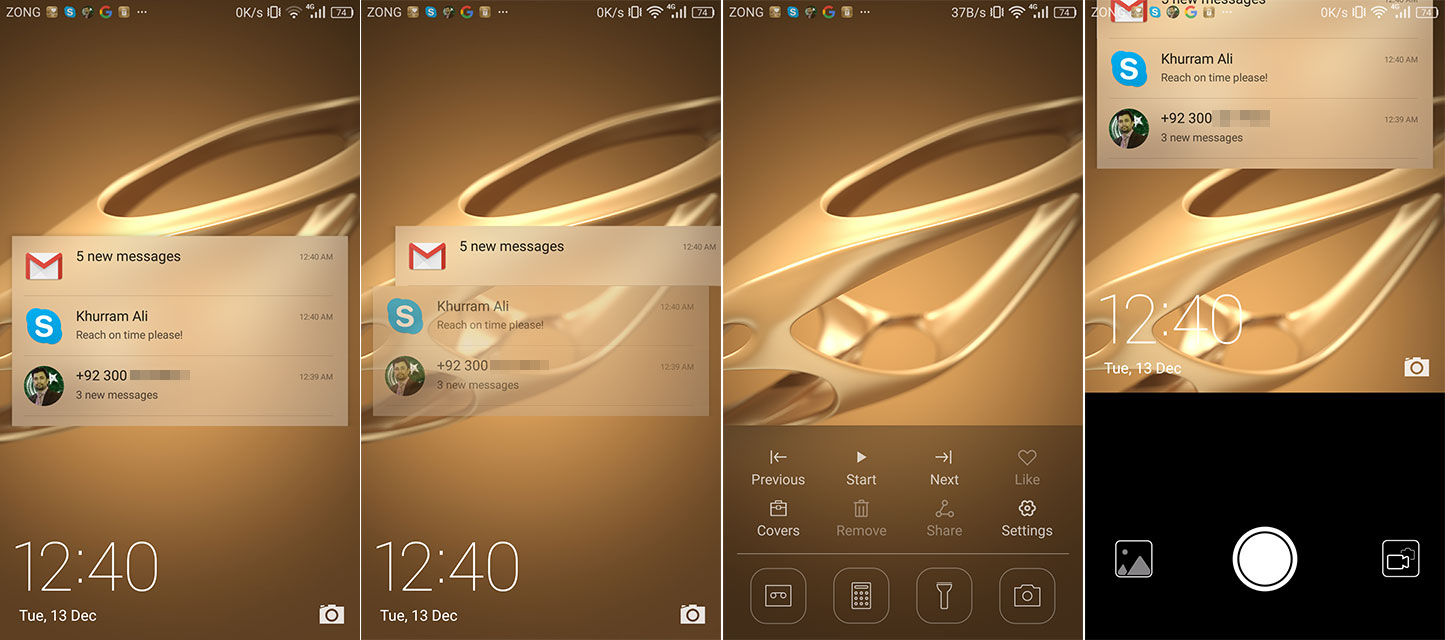
Notifications, if turned on from the settings, also show up on the lock screen, swiping a notification away takes you to the relevant app after unlocking the screen. Swiping up from the bottom edge reveals some shortcuts that include music player controls to directly play, pause the song or switch to next or previous number. There’s voice recorder, calculator, flash light, and camera which do not require you to enter pin even if set for unlocking the screen.
A few more options are there which are related to magazine lock, liking a cover image, sharing it instantly from the lock screen, or removing it from the selected cover images. Magazine cover lock, if not set already, can be initiated right from the lock screen by tapping on the “Cover” option that takes you to a set of cover images which you can choose from total of 500 images to randomly switch on the lock screen when you wake up the phone from sleep mode.

Home screen also offers great flexibility to ease you desire taking from customising it with live widgets and backgrounds to resizing the grid layout to adjust more icons in a row. Down at the bottom of the display it offers a sticky apps/icons row which doesn’t change while swiping through the home screens just like any other user interface.
Folders are pretty common which cover the full screen as an overlay when open. Long tapping at a blank area on the home screen initiates edit mode where you can rearrange the the screens, add/remove them, change the transition how the home screens swipe away, add/remove widgets, change wallpapers or themes. Edit mode can also be triggered by pinching on the home screen. In fact you can change the order of the soft keys (back, home and recent) on navigation bar in settings if you like.


The app switcher is presented in a simple horizontal slider with the app’s last state glimpse along with the current RAM information (free/total). App can be closed by swiping up-side while the down-side will lock the app to keep from closing when you hit “kill all” apps.
EMUI 4.1 on Huawei Honor 8 offers to rearrange your home screen icons in 3 grid layouts with maximum 5 icons in a row or in a column – 4×5 or 5×4 or 5×5. There is an “auto-align” feature that if you move an icon from its place, another icon will take it to realign all the icons without leaving a blank space unlike what you can see in the first screen above – by default this feature is turned off. You can also manually align the home screen by shaking the phone if the “shake” featured is turned on in settings. The badge (notification counter on app icon) can also be turned off on individual apps.


The status bar reflects most of the things going on in the phone and the drop-down panel provides access to the notifications and shortcuts in two separate tabs/sections. Notifications, as told above are really well designed and organised and when applicable, a notification can be expanded by swiping down where you can have access to the actions to respond. On the other hand the “shortcut” section provides 3×3 grid of quick toggles along with a brightness slider.


Phone Manager comes along that offers features to optimise system, manage traffic, filtering incoming calls/texts, monitoring and managing battery consumption and managing notifications for individual apps. Moreover the notification manager gives you option to control notifications from apps that you don’t want as frequently and the way they notify you (on status bar, banners and/or lock screen).
While the battery manager comes with different types of Power Plans including “Performance” – for best experience with higher power consumption, “Smart” – for standard usage and optimised power, and “Ultra Power Saving” – recommended when battery is low where you are left with the most desirable features of a phone, calling/texting and a few others features to keep you on with the phone for several bonus hours if you don’t have a reach to the charger.


In addition to three power plans above, Huawei offers ROG power saving mode that turns down the FHD display to HD resolution of 1280×720 pixels providing even more life time per charge while keeping the density intact. However you will notice less sharpness mostly in text elements, not significantly though.
Software Update
Software update support is another issue which of course is present with all vendors whether a little or in a serious way. Huawei’s software support is somewhere in between or sometime seriously is an issue. Specially when talking about Honor brand, Huawei has revised its policy this year “to provide customers with access to new features (at least once every three months during the first 12 months) for at least 24 months following each product launch.” Huawei has also mentioned that the company “will keep providing access to security and software updates to fix bugs and enhance user experience in a timely manner.” This sounds good but seriously? The Honor 8 you are now reading about here has the security patch of July 2016 and no update is available for this device yet – that’s real bad.
[nextpage title=”Dual Camera – Still Photos & 60fps Video”]
Dual Camera

The dual camera setup in Huawei Honor 8 is extremely similar to what we have seen in Huawei P9. The two 12 MP sensors – one is a standard that takes colour photographs while the other one takes monochrome or the black & white sensor that doesn’t have a Bayer filter which is used in standard sensors to produce colour images. Due to not having the Bayer filter, the monochrome sensor in the dual-camera setup helps produce more detail along with obtaining as more light as three times than a standard colour sensor. That, in turn, helps take better pictures in low-light.
What we don’t have in Honor 8’s dual-camera, is the Leica optics that actually made Huawei P9’s camera worth of putting it in high-end smartphone cameras lineup. It also means that Honor 8 won’t be providing those photo/video features that came specifically to support Leica optics and produce vivid, sharp and smooth image results. I can tell you that it’s a real thing as the pictures from Honor 8’s camera didn’t impress me, they indeed lack the vividness.
Another feature that Huawei P9 has, was straight out of the sensor black & white shots by using the single monochrome sensor. Honor 8 doesn’t give you that thing. Instead it features the software based desaturation of a colour image via “Mono” filter before taking the shot. Due to having produced by the both the sensors involved, it would give better black & white results than most smartphone cameras but don’t expect it to stand by the real monochrome shots from P9.
One difference that you will see instantly among these two phones’ cameras is the user interface and experience. The camera app has clean viewfinder with a capture key on the bottom, photo/video switch on bottom-right and a gallery button on the bottom-left. On top there is flash switch, aperture mode fro shallow depth of field, filter button and front/rear camera toggle. There is no menu right there on screen but the interface has a swipe gesture from left edge that reveals all the camera modes and swipe gesture from right edge reveals the available settings for current/active camera mode.


Quick camera modes include taking photos automatically, or with manual settings in Pro-photo. Beauty mode in still photos as well as when recording videos. There is also a video mode with manual settings in Pro-video. Other modes include Panorama, HDR, Night shot and Light painting etc. The settings interface completely depends on the mode you choose.
Of course auto mode could be a best choice for most of the users but now a days smartphone cameras have become an important part of photographers and enthusiasts which always want to take photos according to their own terms. Pro-mode in Huawei’s system has pretty much good options to deal with. Although Honor 8 also has pro-mode for manual settings, it doesn’t offer RAW format unlike P9.


Like still photos, video recording also support manual settings but not as extensive as in still photos. Although white balance settings in Kelvin temperature values from 2800K through 7000K is a good option in practice. Single tap focus and continuous focus is also supported along with manual control over focus.
1080p video recording at 60 frames per second is supported but can’t use video stabiliser and object tracking, both of which can be used when recording at 30fps.
Thanks to the same dual-camera setup with similar sensors and configuration, Honor 8 can indeed achieve depth information and provide you with the bokeh feature in exactly the same way (picture 4 above). Aperture can be set from f/0.95 to f/16. You can edit those photos to readjust focus and aperture f/stop.


Now that we just checked the aperture control mode above, let’s start with this first. This feature is an output of the configuration of two sensors that help the system to calculate the distance between the camera and the subject quite precisely. That also involves Huawei’s Hybrid and Laser autofocus. With all the data information in hand, the system creates a depth map of the whole scene in the frame, and it’s used to recreate linear blur on the background or foreground or both while having crisp focus on the subject within the frame.
Well this couldn’t be referred to as an optical bokeh or optical shallow depth of field anyway, it’s still generated by the software algorithms. However it’s impressive, as Huawei did good with all the information to create an impressive bokeh effect. The appreciable thing is that you can see bokeh preview in the live view before taking the picture. Likewise, the images can be later edited right in the phone to change aperture control and even the focus point.
Photos with Aperture Control / Bokeh Effect
First of all, all the above photos were taken with aperture control at various f-stop – you can visit the picture at flickr to see EXIF, except the last one. The last picture actually depicts the real/optical blur caused due to the object being closer than minimum focusing distance. So just take it as a reference image for an optical blur if you want to compare it with other pictures above.
Secondly, the system still has flaws most importantly when you try to take a portrait of someone. As I have experienced, with this phone or any other smartphone featuring such a bokeh effect, they might be better with flat subjects lying down in a sequential order but when they had to do some complex job like say on a portrait, they are less than better. Sometimes some errors are also visible clearly such as in the picture of my daughter above. Let alone the soft glow around the clothes she’s wearing, the background blur just couldn’t keep up efficiently and lost near the bottom of her sweater where you can see clear background on the edges as well as the sweater has been smudged.
Other shots are pretty nice but I didn’t like the blur on the tree away from the train track in the third photograph.
Low light shots
Without using Pro-photo mode to take some quick shots, following low light shots were pretty much appealing from Honor 8 – specially the outdoor night shots.
The camera seems to be doing great job with its monochrome sensor to reduce noise at an impressive level. The photograph of the baby was taken at ISO 1600 and the noise level is really impressive. with all the good detail.
Shots with Flash
I actually never rely on flash in the smartphone camera specially when it’s LED or dual LED or some true tone flash etc etc. Mostly they make the picture worse than without using flash. But at some places they do work great. First photo below, for an example, is actually lit up with the flash but it didn’t help reduce the noise level while on the other hand the second picture is what you will like to see. It brought up skin tone much closer to real as well as the flash didn’t just burst out to over expose the shot.
Flash also vanishes the background completely as the light doesn’t reach beyond 1.5 meters mostly.
Daylight Shots
Honor 8 has captured the photos with great detail in a full sunny day. It did pretty good with dynamic range as well as noise levels were good too if not better. What was not impressive, is the colours. As said before, the vividness is something this smartphone camera really doesn’t know about. The colours are just on and off with no solid reason. But if to tell in general, these shots are really good.
At some places you might need HDR feature to bring some light to shadowed areas in your frame. However with me, it hardly worked. I even can’t identify from my pictures if there is significant difference.
Here are some panorama shots, which are good but not taken at full strength.


So in simple words Honor 8’s dual-camera handles exposures very well with impressive dynamic range. Noise reduction is impressive too, even in low-light situations it performs well above average. Colour saturation is quite good and very accurate to actual scene but sometimes it lacks the good colours in the photos and doesn’t appeal to the eyes.
Feature full modes and options in Honor 8’s camera app are quite impressive with likes of aperture control that also works mostly well. There is Pro-photo mode for enthusiasts who want to do more with the smartphone camera according to their own brain. I am not sure about HDR because I was failed to distinct those images shot with HDR mode enabled, with the images that were shot without it.
Considering P9’s HDR images which were pretty good as well as its camera performed very well if compared to the Honor 8’s camera, I can tell that both are quite different. The Leica optics on P9 is the known difference but it’s true that, if the underlying sensors are same in both devices, Honor 8’s camera is not well optimised with the system. Huawei really needs to consider this in upcoming updates planned for this device, if there are any.
Front Camera
Coming over at front, Honor 8 features an 8 megapixel with not as wider lens as many others are now supporting, it’s f/2.4. Even though there is no flash on the front, the system uses bright screen splash to illuminate the the face enough to capture the picture.
In result, it’s much better with the colours and contrast that actually bring some detail into the skin tones. But “beautifying” feature is also there which turns on by default in selfie mode and it vanishes the skin marks making it smooth as really unreal with almost zero detail. So I personally never liked this beauty thing in selfie cameras.
Video Recording
Like with still photos, Huawei Honor 8 provides provides good features with video recording as well. The phone doesn’t have optical image stabilisation (OIS) however, in video recording, an electronic image stabiliser (EIS) works to stabilise the footage pretty well, not impressively though.
Object tracking (OT) is also available that works with tapping an object within the frame to focus it and the system keeps the object in focus while it moves around. This feature actually works well with objects if they are not moving too fast. There are other situations when the camera can lose track of the object; e.g. when the exposure changes suddenly.
Unfortunately, both of the above features EIS and OT are not available when shooting at 60 frames per second. See the table below for more information on the supported video formats.
| Mode | Video Profile | Audio Profile | EIS/OT |
|---|---|---|---|
| FHD 1080p 60 fps | 1920×1080, 16:9, AVC/H.264, ~35 Mbps | 48000 Hz, 192 Kbps, Stereo, AAC | NO |
| FHD 1080p 30 fps | 1920×1080, 16:9, AVC/H.264, ~17 Mbps | 48000 Hz, 192 Kbps, Stereo, AAC | YES |
| HD 720p 30 fps | 1280×720, 16:9, AVC/H.264, ~12 Mbps | 48000 Hz, 192 Kbps, Stereo, AAC | YES |
| VGA 640×480 30 fps | 640×480, 4:3, AVC/H.264, ~5 Mbps | 48000 Hz, 96 Kbps, Stereo, AAC | YES |
| QVGA 320×240 | 320×240, 4:3, AVC/H.264, ~1.2 Mbps | 48000 Hz, 96 Kbps, Stereo, AAC | YES |
| MMS 176×144 | 176×144, 1.222, AVC/H.264, ~195 Kbps | 48000 Hz, 96 Kbps, Stereo, AAC | YES |
Again like in photo modes, Video recording also allows to record in Pro-video mode which gives options to control manually – the metering mode, exposure compensation, focus, and white balance. There you can’t adjust shutter speed or aperture manually but it’s quite extensive if compared to other smartphones. Also note that adjusting aperture is also not present in Pro-photo mode as the feature has its own mode separately – Aperture Control, that only works with still photos. In fact manual white balance control gives exactly same options in video recording as they are in photo mode. With a several presets, white balance can be adjusted manually from 2800K through 7000K in 100K increments.
One key thing is that once video recording has been started, you can’t change anything you have set before hitting the record button. Take a look at the following offers for video recording.
Video Sample: 1080p 60fps
Video Sample: 1080p 60fps
Video Sample: 1080p 30fps, Electronic Image Stabilisation (EIS) Turned On
[nextpage title=”System Performance and Battery Life”]
System Performance and Battery Life

Huawei Honor 8 is powered by proprietary Huawei chipset Kirin 950 – the original chip on which the improved version Kirin 955 was built for Huawei P9. The two chipsets are identical at their cores with a Cortex-A72 and Cortex-A53 but the chip in Huawei P9 which is said to be an improved version is clocked at little higher than the original. In real, the difference is not so significant. In fact, Kirin 950 is what previously featured in Mate 8.
Going in details, the SoC Kirin 950 is built with an octa-core processor (eight ARM cores) featuring four cores of Cortex-A72 clocked at 2.3GHz (it’s 2.5GHz in Kirin 955 of Huawei P9) and four cores of Cortex-A53 clocked at 1.8GHz (identical in Kirin 955). Then both the Kirin 950 and the Kirin 955 feature identical ARM GPU, Mali-T880MP4 clocked at 900MHz.
What we have in Honor 8 is 4GB RAM with 64GB internal storage whereas it was 3GB with 32GB on Huawei P9.
When comparing results with other brands and chipsets, Honor 8 was not so good when it was tested for single-core performance.
Following AnTuTu test gave Honor 8 lower scores than the P9 and Mate 8, Even though Honor 8 was featuring 4GB RAM.

Honor 8 also couldn’t beat P9 and Mate 8 in Basemark OS II tests. But they are pretty much close unlike in AnTuTu tests.

Interestingly, Honor 8 took a long jump in 3D test crossing over Mate 8, P9 and even Samsung Galaxy Note 5. In Basemark X test it’s just below Galaxy S7 edge in the list we had with the test scores.
 On Multi-core test with Geekbench, Honor 8 is still below P9 and Mate 8 where P9 is topping the list of scores what we had for comparing.

In single-core test with Geekbench, Honor 8 was a bit better than Mate 8 but keeps low than P9, Galaxy S7 and iPhone 6s.
 Trying with Vellamo suite of tests in single and multi cores as well as the browser test, Honor 8 also couldn’t make it to impress a lot. Vellamo Metal keeps Honor 8 after Galaxy S7, LG G5 and Huawei P9.

In multi-core test with Vellamo, Honor 8 is stil below P9 and a couple of other brands.

Browser test Vellamo also keeps the Honor 8 at lower position than of P9’s and Galaxy S7’s

In an uninspiring way, with Jet Stream of browser test suite, Honor 8 could perform only to stay below than many other devices including P9 and OnePlus 3

Standing among the high-end smartphones, this mid-range priced smartphone is a big deal to checkout. Concerning over these numbers are only to have an idea what kind of powers a smartphone could have but in real, Honor 8 didn’t fail me at any situation. I worked really great.
One thing that bothered is that the phone gets real warm when you are using camera, more importantly under direct sunlight.
Battery is another good thing with this smartphone. It can stay up the whole day while an hour or two of GPS and navigation usage may drop it significantly but won’t drain it harder, you still will be left with a lot more. Then you get Ultra power saving with a very few set of features that helps specially when you are out of reach of recharging and want to have calls and text on. ROG power-saving is the last thing you can do to improve the battery timings while keeping the usable smart features intact. This thing actually lowers the screen resolution to 720p from the native 1080p, which technically lowers the battery consumption and allows you to do everything could do in full HD mode while gives you more time with it.
While the battery did perform well when in use, but when in standby mode, it still keeps being used by un-managed apps and services, which I somehow couldn’t manage.
[nextpage title=”Verdict & Conclusion”]
Verdict & Conclusion

Huawei Honor, as a separate brand is known for covering many ranges of smartphone with its variations in features and prices. Honor 8 stands and the higher mid-range slot where you pay for lower than a higher-end price range while get more from the higher-end features.
With no doubts, Honor 8 has an excellent premium design which is slick and smooth. Reminding you of the fingerprints it catches very easily. Display is sharp and vivid in indoors while outdoors it’s also really impressive but reflections are also prone to enter through.
Honor 8’s camera is a well performer in still photos with impressively high dynamic range. Colors are good but not all the time. Fine detail in the still photos is really good. The options in the native camera app are just above competitors. Low-light performance is also good but night shots have a little less detail than in a good ambient light. With using a good equipment, specially a tripod, night shots could be amazing as the exposure handling in Huawei’s camera configuration is better than the competition.
I am really not among the ones who hate the EMUI but I in fact recommend using it and you would get used to it – I am not guaranteeing it though, I am just talking about my experience with it. With Android 6 Marshmallow the software is really good with a lot of customisation.
But specifically when talking about Honor 8 and P9 – the two relevant devices from same manufacturer, I’d say the price of Honor 8 is far higher than it should be. I’d recommend to checkout Huawei P9 instead if you prefer to buy a Huawei made smartphone.
Huawei has already dropped the price of Honor 8 in many other regions while the price in Pakistan is still PKR. 48,499 (or ~$467) That’s why you should buy a Huawei P9 which in Pakistan is now selling for PKR 45,000/-
So with the current price of Honor 8, it’s no-recommended smartphone. There are a few other brands offering with similar specifications and are available in the country via online stores. One of them is OnePlus 3.


